Claude + Obsidian = $1M YouTube on Autopilot

Most content creators use AI as a temporary worker with amnesia. Every time they open a new chat to write a script, they waste tokens and time re-explaining their niche, target audience, brand voice, and video style.
The era of relying purely on clever prompts is over. The future belongs to Memory Design. By connecting Claude Code with Obsidian, you build a self-sustaining, compounding "Second Brain" or LLM Wiki.
Here is the comprehensive, step-by-step guide to setting up this architecture and weaponizing it to build a highly profitable YouTube content factory.
Section 1: Setting Up the Architecture (Obsidian + Claude Code)
Obsidian stores everything locally in plain text Markdown (.md). Because it is flat and simple, Claude Code can directly read, write, create files, and generate cross-links across your entire database without needing complex external APIs.
- Step-by-Step Installation
Before starting, ensure you have Node.js (Version 18 or later) installed on your machine.
Download and install Obsidian.
Create a new, empty folder on your PC (e.g., YouTube-Brain) and open it as a new Vault in Obsidian.
Open your system terminal (or command prompt), navigate to that folder, and install Claude Code globally:

- Installing the Automation Framework
To make Claude understand how to navigate and manage Obsidian autonomously, you need to install two core open-source toolkits within your Claude Code environment. Run these commands inside the Claude CLI:
Once installed, run the initialization command:
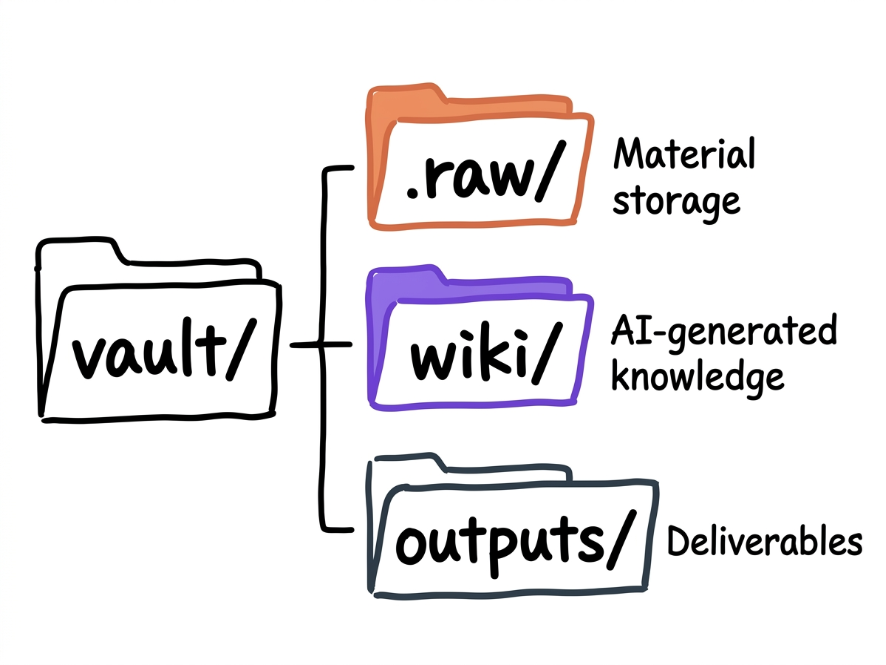
This single command automatically deploys Andrej Karpathy’s recommended LLM Wiki folder structure inside your Obsidian Vault.
- The Structural Layout
Your Obsidian file tree will now look like this:
- Creating the Onboarding Blueprint (Memory.md)
In the root directory of your Vault, manually create a file named Memory.md. This serves as an onboarding document for Claude. Copy, paste, and fill out this template:
Section 2: The Core Workflow Commands (How It Operates)
Managing your Second Brain shouldn't feel like a chore. The system relies on a continuous three-step loop: Insert -> Listen -> Grow.
Command:
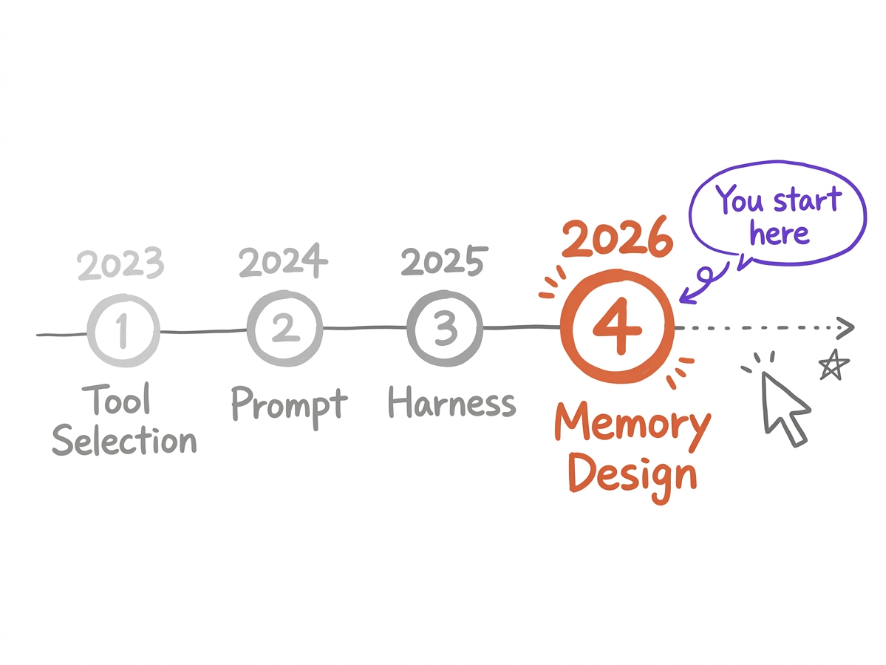

ingest [.raw/file.md]
/autoresearch [Topic]
/save
lint the wiki
💡 Token-Saving Framework: Claude does not read your entire vault for every single prompt. When you ask a question, it only scans hot.md (recent context) and index.md (the map) to pull the exact relevant pages. This ensures lightning-fast responses and keeps API costs predictable.
Section 3: The YouTube Content Factory Pipeline
Now that the system is live, we turn it into an automated content engine designed to identify viral opportunities, optimize for viewer retention, and minimize execution overhead.
Step 1: Automated Asset Harvesting
Never write scripts based on guesswork. Feed your .raw/ folder using an Obsidian Web Clipper or the defuddle tool with high-signal data:
Competitor Transcripts: Pull the text from the top 5 performing videos in your niche.
Comment Sections: Scrap the YouTube comments of viral videos. This acts as a goldmine for extracting raw human frustration, questions, and unmet demands.

Social Arbitrage: Ingest trending technical threads from X (Twitter), Reddit, or hacker communities.
Step 2: The Knowledge Compounding Phase
Run ingest on your raw inputs. Claude parses the data and builds hyper-specific reference files inside /wiki/, such as:
wiki/Retention-Tricks.md -> A synthesis of exactly how top creators pace their videos.
wiki/Audience-Pains.md -> A map of what viewers are actively begging to see explained better.
Step 3: Prompting via the Wiki Core
When it's time to generate a script, do not ask Claude to "write a generic video." Instead, leverage your compounding database. Run this prompt inside your Claude Code terminal:
"Claude, review wiki/Retention-Tricks.md for our target retention framework and wiki/Audience-Pains.md for current viewer gaps. Write a highly dynamic, 10-minute YouTube script about [Your Specific Topic]. Store the final draft in /outputs/script_v1.md."
Claude will generate a script tailored precisely to what is already statistically working in your market, written in your exact brand voice.
Section 4: The Monetization Engine (Turning Knowledge into Cash)
Building this engine opens up distinct, highly lucrative monetization vectors:
- SaaS Arbitrage & High-Conversion Traffic
Because Claude + Obsidian allows you to produce data-rich scripts at five times the speed of an average creator, you can maintain a hyper-consistent posting schedule. Use your videos to showcase practical, automated workflows built via tools like Claude and Cursor.
The Play: Build lightweight, functional Micro-SaaS tools or automation templates.
The Funnel: Showcase the tool in action on YouTube -> Link to the product in the description -> Convert viewers into recurring monthly subscribers.
- Multi-Platform Cross-Pollination (The Content Matrix)
Do not let your output stop at a single YouTube video. Once a script lands in /outputs/, command Claude to split that single asset into an entire ecosystem of content:
"Convert /outputs/script_v1.md into an engaging, data-heavy 10-post thread for X using Money Twitter styling constraints."
"Condense this script into a 150-word text blast for Telegram focusing heavily on actionable execution steps."
"Extract three 40-second high-impact hooks to use as scripts for YouTube Shorts."
- Asymptotic Workflow Optimization
By letting AI handle the maintenance, cross-linking, and structural updates of your knowledge base, you eliminate the overhead of hiring research assistants, editors, or freelance scriptwriters.
By Month 2, the compound interest of your database kicks in. The system will hold so much contextual depth regarding your niche that it will autonomously call out trends humans missed, notice links between totally separate source articles, and pitch you unique, contrarian angles for your next viral video before your competitors even know the trend exists.
Implementation Roadmap for the Weekend
Week 1: Complete the terminal setup, configure Memory.md, install the plugins, and ingest your first 3 high-impact target transcripts.
Weeks 2-3: Build the daily habit of dropping notes, bookmarks, and transcripts into /.raw/ and running ingest.
Week 4: Run your first script queries based on the compounding wiki folders, generate your multi-platform content assets, and launch your automated content pipeline.
Thank you for reading this guide, save it as a bookmark so you don't lose it 📝
Prompts
YouTube-Brain/
├── .raw/              # Raw inputs: Competitor transcripts, web-scraped articles, brain dumps.
├── wiki/              # The AI-maintained Knowledge Base.
│   ├── index.md       # Master Table of Contents (Automatically updated).
│   ├── hot.md         # Context Cache (~500 words of recent focus).
│   ├── log.md         # Operation logs (tracking what was ingested and when).
│   ├── overview.md    # High-level summary of your entire Vault.
│   └── {topics}/      # Automatically categorized folders (e.g., /Hooks, /SaaS-Ideas).
└── outputs/           # Finished deliverables: YouTube scripts, X threads, newsletters.
# Add the marketplace and install the application layer
claude plugin marketplace add AgriciDaniel/claude-obsidian
claude plugin install claude-obsidian@claude-obsidian-marketplace/wikinpm install -g @anthropic-ai/claude-code4. Launch the AI agent by typing:
bash
claude# Channel Profile & Business Logic
- My Persona/Role: Content Creator, Growth Hacker, and Micro-SaaS Builder.
- YouTube Channel Niche: AI Automation, Prediction Markets, and SaaS Arbitrage.
- Target Audience: Solopreneurs, developers, and side-hustlers looking to build digital leverage.
- Core Channels Tools: Claude, Cursor, Vercel, n8n, Premiere Pro.
- Script Constraints: High retention, analytical yet punchy, data-driven narrative, zero fluff. Use the "greentext" formatting style for stories.[Raw Intakes] ➔ Ingest to /.raw/ ➔ Claude Auto-Linking ➔ Structured /wiki/ ➔ Multi-Asset Scripting ➔ /outputs/Links
Related articles

Lock in your room for 3 month to become AI Engineer (step-by-step plan below)
Eight months ago I dropped $2,400 on a 12-week AI bootcamp, kept a $59/month subscription to a "prompt mastery" platform running for four months straight, and bought a $349 lifetime deal for a course…

Build a Second Brain Claude Code Can Actually Use
The Obsidian + MCP setup that stops every new chat from starting at zero.

How to Build A RAG System Using Claude: An AI That Runs on Your Own Data (Full Guide)
Ask Claude about your company, your notes, or your files, and it draws a blank. It never saw them. It only knows what it learned in training, and your stuff wasn't part of that.