How to Create AI UGC Ads That Actually Sell Your App

Building apps has never been more accessible. Anyone can ship something now. The hard part isn't building anymore.
It's getting anyone to care about your app.
Most founders hit the same wall: no marketing budget, no audience, no idea how to make content that doesn't look like a boring ad.
So here are 2 video formats that work for promoting apps on TikTok: short, native feeling and effective regardless of your niche. And I'll show you how to make both of them using Claude and Arcads MCP, without expending any money on UGC creators or influencers.
Two TikTok formats that actually work for apps
Most app ads fall flat because they look like app ads. What converts on TikTok is content that feels native, like something a real user would post.
These are the two formats I've been building with Claude + Arcads MCP.
What is Arcads MCP?
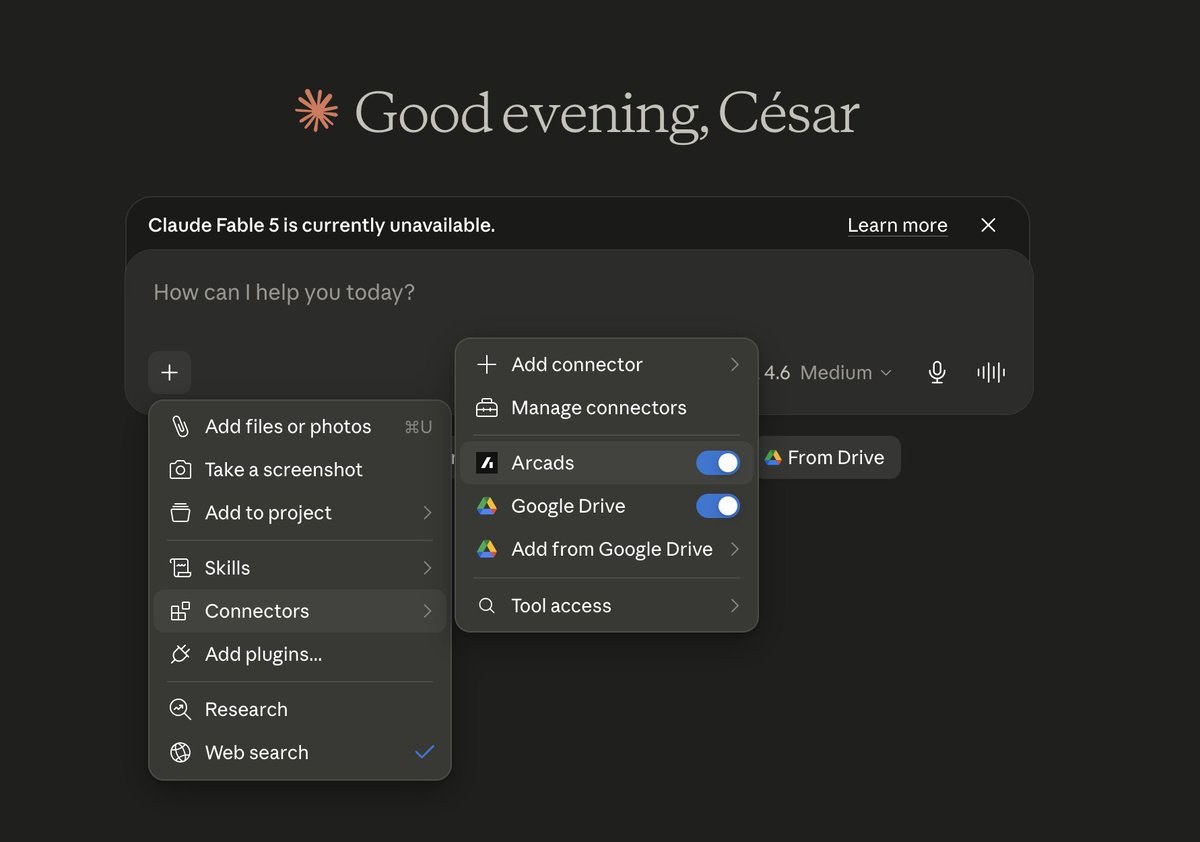
MCP (Model Context Protocol) is an open standard that lets Claude connect directly to external tools. Instead of jumping between apps, Claude talks to them in the background and you prompt to Claude.
Arcads MCP is Arcads' implementation of this. It gives Claude access to AI actors, video generation, and your entire Arcads studio, all from a single chat.
Setup takes about 2 minutes:
- Open Claude → Settings → Connectors
- Add the Arcads MCP server URL
- Sign in with your Arcads account

That's it. No API keys. No config files. No workflow builder.
Now you can use Arcads inside Claude:
Format 1: The Reaction Video
You've seen this format a hundred times. Someone discovers something, reacts emotionally ("why did nobody tell me about this?") and then you see the thing that caused the reaction.
For apps, it maps perfectly:
- Top half: AI-generated reaction clip. A person laughing, crying, looking genuinely shocked
- Bottom half: A real screen recording of your app in action, POV style
The hook writes itself: "Why is no one talking about this app?" or "I wish I found this sooner."
How to build it in Claude:
First, write the brief in Claude. Describe your app, your target user, and the pain it solves. Ask Claude to suggest the ideal emotional reaction and actor profile for your audience. Then:
Using Nano Banana Pro, generate an image of a woman in her late 20s,
candid expression, reacting with genuine surprise. Natural lighting,
no text, vertical format.
Once you approve the image, generate the video:
Using the approved actor image, recreate this video reaction clip
with Seedance 2.0. She should look like she just discovered
something that surprised her. Handheld feel, no audio needed.
Then stitch it in CapCut: reaction on top, your screen recording on the bottom, bold caption as the hook. Done.
Here's the result:
Format 2: The Green Screen Walkthrough
This one is underused. An AI spokesperson appears over a live recording of your app, talking through exactly what they're seeing on screen, like a friend showing you something cool.
It feels more trustworthy than a voiceover. More personal than a demo. And it takes maybe 20 minutes to produce.
How to build it in Claude:
Then generate the actor:
Using Nano Banana Pro, generate an image of a woman in his early 20s,
green background, professional setup. vertical format.
Will be used as a green screen overlay.
Generate the video:
Using the approved image, create a 12-15 second video with Seedance 2.0.
He should speak naturally and say: [Claude's script].
Minimal movement, clear speech, plain background for easy keying.
In CapCut: place your screen recording as the background layer, drop the AI actor on top, key out the background, position them in the corner or side. Add captions. Export.
Here's the final result:
Why this beats the old workflow
The old way: brief → Fiverr/UGC platform → wait → receive clips → reshoot because the product looks wrong → wait again.
This way: brief → Claude → Arcads MCP → done. In one conversation.
The quality is good enough that most viewers can't tell. And more importantly , you can iterate. If the hook isn't landing, regenerate it in 5 minutes and test again. That kind of speed is only possible when the whole process lives in one place.
What it's best for
This workflow makes the most sense if:
- You're running paid TikTok or Meta ads for a B2C app
- You need volume. Multiple angles, multiple hooks, fast
- You don't have budget for a full creative agency
- You want to test before you scale
It's not magic. You still need a good product and a real screen recording. But the barrier to getting your first 10 test creatives out the door just dropped significantly.
Building a bootstrapped business has never been easier than now. You can build an app in a weekend with Anything, then promote it with AI videos using Arcads. No agency, no team, no excuses.
If you want to follow my journey building in public, I share everything at @cesaralvarezll.
Related articles

How I'd make $10 million with AI agents
Two markets worth trillions are opening at the same time. I've been through 3 platform shifts living in Silicon Valley building/selling VC-backed companies and I've NEVER seen this.

How People Are Making 5k$/M With AI Girls: UGC Models, AI Model, And The Real Workflow
Most people still think AI girls are just Twitter bait.
How to turn a boring study app into $5M with one mascot
Finch turned a simple self-care app into a daily habit machine with one virtual bird. Users build real consistency and the app sees strong retention and growth.