How To Print Money With Fable 5 + Higgsfield (content machine)

If you're going to focus on just one strategy to print money with AI, make it this.
I'm launching a new product in a few weeks, and I've built everything for it using nothing but Claude Fable 5 and Higgsfield.
Every ad, marketing video, product photo - all of it, generated end-to-end without touching a traditional design tool or hiring a creative strategist.
In this article, I'm going to show you exactly what I did, and why I believe this combination is genuinely the future of content and marketing.
Everyone's talking about AI agents right now (and rightly so), but I think video and creative generation is the next real frontier of AI that most people are completely sleeping on.
By the end, I'm also going to walk you through the exact money-making plays I'd run if I were starting from zero today.
Contents
l: What is Higgsfield?
ll: How To Connect Higgsfield to Claude
lll: Building a Product Launch Kit With Claude + Higgsfield
IV: Realistic Money-Making Plays
Let's get into it.
What is Higgsfield?
Higgsfield is essentially the ultimate tool for AI creatives.
Think: generating photos, videos, ads, short-form content, and so on.
This tool brings everything you need to create banger AI content into one UI and gives you access to every cutting-edge model in the game in one place (Seedance 2.0 in 4K, Nano Banana Pro, voice models, audio models - all of it).
Instead of hopping between five different apps to generate an image, audio, video, etc., you can use Higgsfield as a centralized hub.

The real unlock: the Claude MCP connection
The most important recent change is that Higgsfield is now accessible directly through an MCP, meaning you can prompt your Claude chat and generate images, video, voiceovers, and more directly through Claude itself.
How To Connect Claude + Higgsfield
Setting this up takes less than two minutes, and once it's done, you never have to think about it again.
Step 1: Go to https://higgsfield.ai/mcp
Step 2: Copy the Higgsfield MCP URL
" https://mcp.higgsfield.ai/mcp "
Step 3: Open Claude and add a new connector
In Claude, go to Customize → Connectors, and click the button to add a new one.
Paste the URL you copied from the webpage and click Add.
That's the entire setup. You can view or manage the connection at any time by going back into Customize → Connectors.
Using the MCP
Once connected, there's no special syntax or separate interface to learn. You just chat with Claude normally.
For example, if you wanted to use Higgsfield to generate an image of a beautiful beach at sunset, Claude will automatically route that request through the Higgsfield MCP, and you can even specify which underlying model you want it to use.
Pairing with Claude Skills
Because this runs directly through Claude, you're not starting from a blank slate every time. Your existing Claude Skills, memory system, and project folders carry over automatically.
I personally built a video production skill that I can trigger with /video-production-pipeline.
Claude will automatically pull in the Higgsfield MCP as part of that existing workflow, generating the exact video and photo content I need.
Building a Product Launch Kit With Claude + Higgsfield


Here's the exact process I've used to create insane creatives for my personal brand (many of which you see here on 𝕏).
For context, I have an actual product launching soon (more on this later), and I used Higgsfield to piece together the entire creative campaign.
Step 1: Build the Brand Identity on Claude Design
The first thing I recommend is to create the brand identity directly in Claude Design.
Things like logos, fonts, color palettes, and so on.
For the purposes of this article, I'll create a campaign for an AI tool that helps small businesses.
I actually recommend spending some time brainstorming with Claude.
Give it some context about what you want to do, have it research other trending designs, etc.
Once the design is finalized, you can export it (Share → Export → Download) and save it as the design system for the rest of the project.
Step 2: Build the Creative Brief
With the brand identity in place, the next step is to create a brief for the actual ad creatives.
For this launch, the theme was built around a specific narrative: freedom from work, and letting your agents handle things while you live your life.
So the creative direction leaned into visuals like:
A man in a hammock with his laptop on the grass
A woman on a beach chair, eyes closed, laptop beside her, "the proposals went out this morning"
A woman in a bubble bath reading a book, laptop nearby
It's a deliberate lifestyle narrative: automate your work, get your time back. It's one of the most effective narratives in AI right now, because everyone wants to automate their business, their trading, their life, and make money while they sleep.
For this step, I just used Claude Cowork to create the ad briefs:
Step 3: Package Everything Into a Brief File

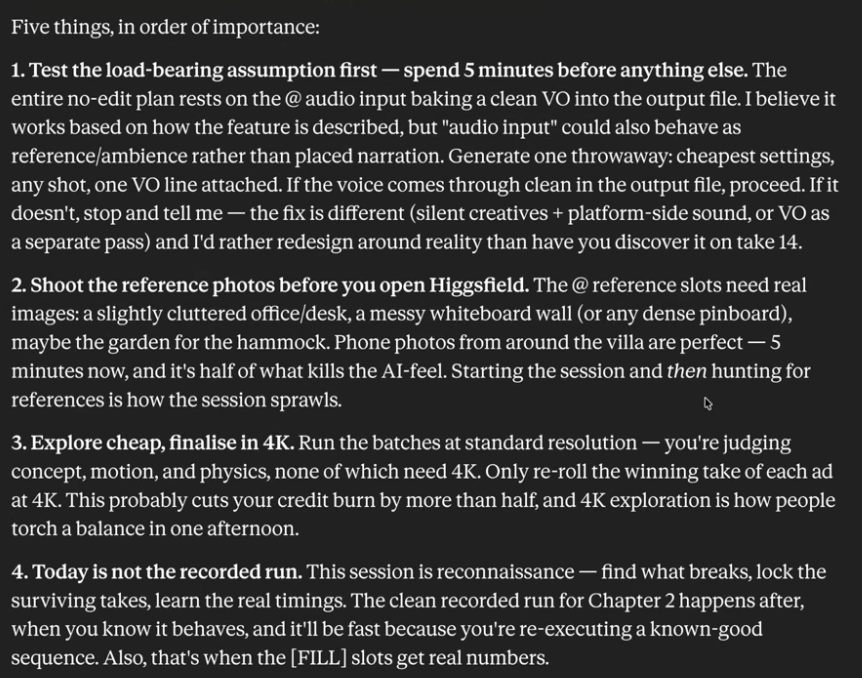
Once I was confident in the ideas, Claude packaged everything into a copy.md file containing:
All the rules for Higgsfield to follow
Every video and photo concept
The specific model to use for images (GPT Image 2, in this case)
Platform-specific copy for each piece of content
This file, combined with the brand system file from Claude Design, became the complete set of instructions for execution.
Step 4: Execution
With both files ready, drop them into Claude and simply say:
Using these files and the context in the copy.md file, please execute on
the creatives outlined in the document as accurately as possible using
Higgsfield.
Btw, you don't have to build a separate file the way I did. You can just chat back and forth in a single conversation, land on an idea, and have Higgsfield execute it directly in that same chat.
I just built a dedicated file for this demo to show what bulk execution looks like, since the real power here lies in running multiple streams of video and image generation simultaneously.
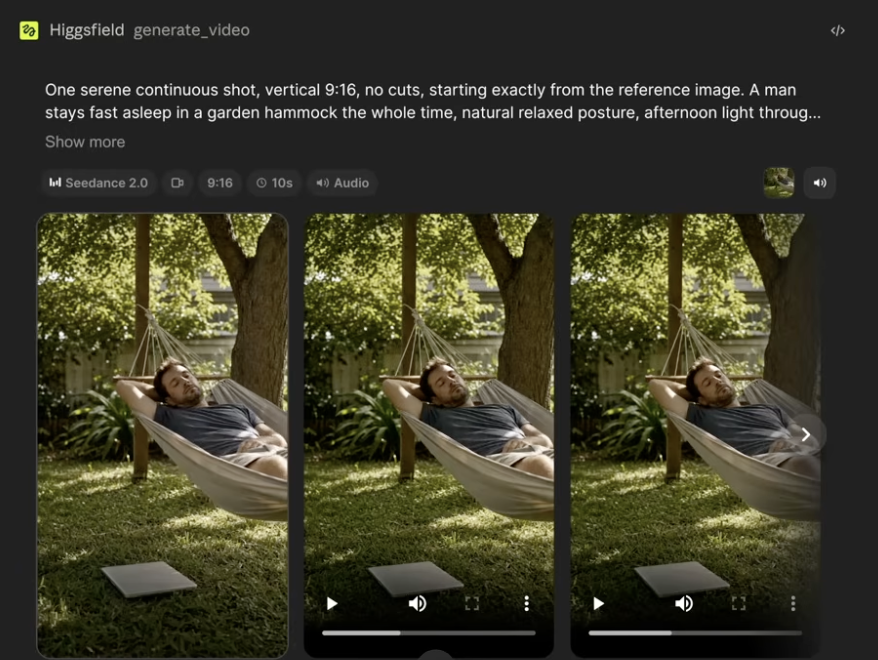
What came out of it
This was, personally, my favorite creative from the entire brief.
A man swinging in a hammock to really emphasize the "AI is automating my life" narrative I was going for.
From here, it's pretty easy to slap copy on these creatives and run aggressive campaigns on Instagram, a landing page, or really anywhere that needs content.
Realistic Money-Making Opportunities
Now, let's get into the real sauce and money-making opportunities with this tool.

I really do think AI is the future of marketing, so here are some thoughts on how I'd personally recommend using a tool like Higgsfield to scale actual revenue:
Play 1: Content for Local Businesses
The simplest entry point.
You charge per video for local businesses that need content but don't have the time or skill to produce it themselves.
Get a few starter images of their business and team, then use Higgsfield to extrapolate and build full creatives.
What I'd specifically recommend is targeting underserved local businesses like automotive shops, lawn-mowing companies, etc.
Targeting these companies means there's virtually no competition for you as a creative strategist, and it's easy to sell them a one-time website design fee or secure a retainer to produce social content for them on a monthly basis.
Pair this with a skill like SEO-optimization, Instagram strategy, etc., and you'll have an online money printer where you can use Higgsfield to just spit out insanely effective creatives.
Play 2: Start a Faceless Channel
This is a genuinely interesting path that also doubles as a way to learn the content game.
Higgsfield has tools like Supercomputer, which allow you to spin up fully custom avatars and build an entire faceless brand or channel around it.
Build a likable brand, learn to go viral on social media, and you can monetize through sponsors, products, and more.
Play 3: Ad Engine
Your job is to essentially A/B test ad creatives and manage businesses' ad dashboards.
This works because there's a real-time arbitrage at play.
Plenty of business owners and other creators know how to run ads themselves or could learn, but they don't want to spend their time on it - that gap is essentially your opportunity.
Learn the basics of ads, then use Higgsfield to actually produce the content.
Pricing for this kind of retainer realistically runs ~$5K a month, sometimes with a performance percentage on top.
Some advice
I've done $20M+ in revenue running a creative agency.
I know many of you are trying to make your first $10k/mo, and I really believe that if you work and master the fundamentals of content, marketing, and social media, it's an achievable goal.
Using tools like Higgsfield alone won't just "make money"; you need an underlying skill set to which you can add an AI layer to become more efficient.
I can think of dozens of other business models with this creative engine, but the point is, marketing/social media is everything now, and being able to mass-produce effective creatives is a skill almost any business will pay for.
Whether it's ads, organic social media marketing, or landing page design, this skill is extremely valuable, and ideally, you pick a vertical where you have prior experience.
Final Thoughts
I hope this article gave you some new ideas for how you can use AI creatives to make money online.
To get started with the Higgsfield MCP, just copy the MCP connection URL here:
If you found this valuable, be sure to follow me here @aiedge_ - Every single week, I post AI guides breaking down the hottest topics in AI.
Lastly, if you enjoy AI content in a written format, feel free to subscribe to my free AI newsletter.
Every Wednesday, I put together an easy-to-digest AI letter covering practical guides, the latest AI news, my personal research, AI tips & more.
100% free, no spam ever & unsub anytime
https://newsletter.aiedgehq.co/
Thanks for reading.💙
Links
Related articles

how i cook 30 winning AI ads in 30 mins w/ claude x higgsfield MCP
i timed the last production session.

One Prompt. One Button. A Fully Deployed System. This Is What AI Engineering Looks Like in 2026
Six months ago this required a backend developer, a DevOps engineer, and two weeks. Today it takes a single sentence and Claude. Here's the complete architecture - and why most developers haven't fig…
Claude Code Can Now Run Your Creative Team While You Sleep
Most people are still opening Canva.