The Official Apple Admaxxing Method ($0 to $1k mrr in 25 days).

I've found an open door. A moneymaxxing glitch in the matrix.
I've coached 4 people to do this: 100% success rate.
Everyone saw profitability in their first week.
We're all steadily growing ~$50+ mrr every single day.
> You get $100 free in ad credits from apple to try this. > > Zero downside & unlimited upside.
Lock in. Retire your mumsy. This is the playbook.
STEP 1: Fundamentals
This advice gets repeated a lot, so we'll keep it short:
-
Copy a proven selling to human desire (Umax, PrayerLock, CalAI, etc).
-
iOS only, RevenueCat for payments, PostHog to track onboarding.
-
Hard paywall: 7.99/w + 14.99/m + 49.99/y.
-
Copy the onboarding from your competitor, aim for 80%+ completion.
-
80% of your dev effort should be: Onboarding & Paywall.
-
Don't send notis, if you do, send them based on user activity.
-
For this method: You need cracked app store screenshots.

STEP 2: RevenueCat x Apple Ads Integration
In RevenueCat, under "Integrations", set up Apple AdServices.
It takes 3 clicks, then it's done forever.
This gives us data to see how our campaigns are doing.
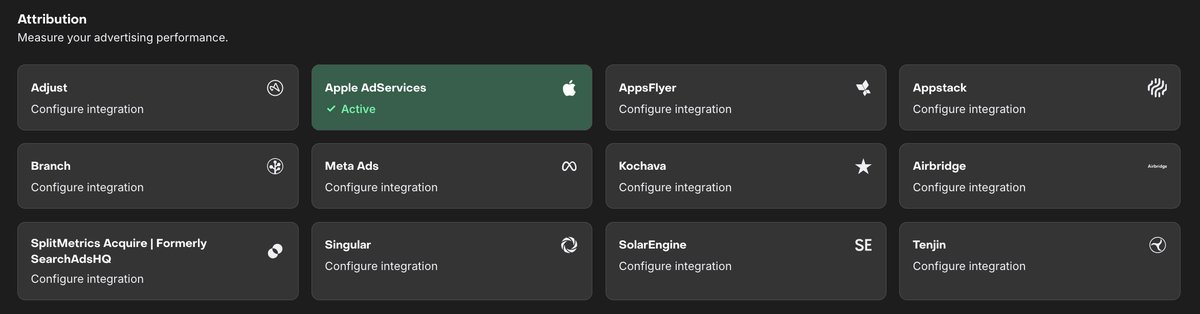
Specifically, this gives us:
• Customer data: by country, campaign & ad keyword.
• This is everything we then need to analyse & optimise our ads later on.

STEP 3: Apple Search Ad Setup (SAUCE).
- New Campaign
• Choose your app
• Type of Ad: Apple Search Ads
• Country: US (we will add new campaigns later)
- Bid Strategy
• Set to "Manage Bids"
• We don't want "Search Match"
• This uses broad keywords
• We specifically want to target traffic from competitors.
• Daily Budget: Higher = faster feedback. $30+ really.
- Ad Group
• Default Max CPT:
-
Will vary on niche, start conservative
-
Apple's recommended is usually good.
- Search Match
• Turn this off!!!
• Apple will ruin your ads if you let them.
- Keywords
• SET TO YOUR COMPETITOR'S NAME.
• Or: Variations on the name.
• Use specific keywords only, not broad.
• This is defined by square brackets: [keyword].
- Audience
• Keep this default: broad as possible.
• Unless your app is age or gender specific.
• However we do want to set:
-
iPhone only
-
Customer Type: New Users
-
Ad Scheduling: off
-
Locations: Keep broad.
- Ad
-
Keep default product page to start with.
-
After you're confident in spend, experiment with custom pages.
-
Here, we can change the images, closer resembling the competitor.
Notes:
Create 3 separate campaigns.
The only thing we're changing is the country, and the max bid.
• Tier 1: US only.
• Tier 2: UK, CA, CN, JP etc
• Tier 3: ROW: TH, PH etc.
This lets us scale our spend and max bids by country.
Max bids should scale alongside the tiers: i.e TH is cheaper than the US.
• Don't worry if the ads don't spend in the first day or so.
• I've noticed a lag from campaign setup to spend.
> This works if your app is the same niche & has a similar aesthetic to a big competitor(s). We let the competitor do the marketing, bringing users from socials to the App Store. We then catch users as they're searching, we interest them with our app instead of theirs. > > This relies on having a cracked app page, so your design needs to be on point. You can use GPT-Image-2 for this. Apple Ads have higher CPA vs other platforms. But, keep in mind, these users are warm leads, they already have intent, and are more likely to convert.

STEP 4: The Feedback Loop.
- Wait and see how the ads spend.
• If they don't spend by start of day 3, increase max bid.
• Don't jump to crazy bids right off the bat.
• You're learning your niche & the ad spend range.
• If your ads don't spend = Competitors spending more.
- Monitor your reviews: Kill countries below 4.5 stars.
• No one is going to click on an ad that has 1 star reviews.
• Give Claude your app link: Ask him to break down reviews by country.
• Remove any country from your campaigns below 4.5 stars.
• You're burning money otherwise!
STEP 5: The Big Leagues: Data Analysis & Scheduled Data Exports
RevenueCat's analysis features are amazing.
But we can't split their dashboards by two dimensions.
For us, we need to understand conversions by:
-
Ad Keyword
-
Ad Campaign
-
User Country
Aka: Transaction level data.
RevenueCat provides this feature for free.
Integrations > Scheduled Data Exports.

You can connect to any Cloud Platform, I used Google Cloud & GCS.
Set up the integration and then collect your yummy data.

Save this file somewhere & then export your Apple Ad spend.
This is in the "Insights" tab.

With these two files we now have:
-
Apple Ad Spend, broken down by country, campaign, keyword, CTR, etc.
-
Transaction data: actual conversions, we can tie to this ad spend data.
Give these two files to Claude & implement the suggestions.
• For me, I found a 3x ROAS keyword inside my US campaign that I scaled.
• Others found similar: Claude will tell us what to kill and what to scale.
• Scale the winners, print cash, go euromaxx summer.

TLDR:
- Copy a proven app selling to core human need.
- Hard paywall at $7.99/week and $49.99/year (14.99/m optional).
- Optimise & iterate onboarding > 80% and conversion > 4%.
- Make cracked App Store Page with GPT-Image-2.
- Set up RevenueCat Apple Ad integrations.
- Run Apple Store Search Ads at $30/day.
- Get Apple Ad Spend & RevenueCat Scheduled Data Exports.
- Feed them to Claude.
- Find winning campaigns & keywords.
- Scale it to the moon: grow mrr $50-$100 a day.
- Retire mumsy, go to the gym & enjoy your euromaxx summer.
Article Metadata
Author: Frederick James (@_frederickjames) Post ID: 2071187278286733629 Source: https://x.com/_frederickjames/status/2071187278286733629 Article: https://x.com/i/article/2070159995958702080 Published: 2026-06-28T11:01:42.000Z Captured: 2026-07-11T05:56:18.305Z
Stats:
- Replies: 64
- Reposts: 55
- Quotes: 57
- Likes: 1,254
- Bookmarks: 5,908
- Impressions: 700,529
Free tweet.md conversion: 4 of 5 this month. Need richer author metadata or more conversions? Add credits: https://tweet.md/i/topup
Related articles

the 4,000 year old pattern across EVERY viral youtube video
what if every script you've ever written is a remix of storytelling techniques that are older than the pyramids?

how we're engineering KILLER google ads funnels with fable 5
fable 5 is Anthropic's most capable model ever released to the public.

A CLAUDE AGENT CAN FIND THE $30K ZIP CODE A FRANCHISE IS IGNORING
Imagine you own a franchise with 27 clinics, looking at another report, and saying: