AI Tools That Will Actually Change Your Life (And Your Bank Account) - The Only Guide You Need in 20

AI Tools That Will Actually Change Your Life (And Your Bank Account) - The Only Guide You Need in 2026
Okay real talk for a second. I've been messing around with AI tools for years now, testing basically everything that drops, burning through free trials like they're going out of style, and I gotta tell you something: most "AI will change your life" content online is complete fluff. It's recycled listicles written by someone who opened ChatGPT once and called it a day.
This is not that.
This is a deep, no-BS breakdown of the AI tools that are genuinely worth your time in 2026, split into two massive sections because honestly your life has two big buckets of problems: the stuff you deal with every single day (emails, scheduling, random life admin, learning new things, staying healthy, not losing your mind) and the stuff that actually makes or breaks your business (customers, content, sales, money, hiring, growth).
I'm going to walk you through both. I'm going to compare the big paid tools against the free options that nobody talks about enough. I'm going to tell you flat out when the free version is actually BETTER than the $200/month tool everyone's hyping on LinkedIn. And at the end of each section, I'm giving you a step by step guide on how to actually automate this stuff, not just use it manually like it's 2023.
Fair warning: this is long. Like, really long. Grab a coffee, bookmark it, whatever you gotta do. I wrote this the way I'd want to read it if I were starting from zero and didn't want to waste six months figuring out what actually works.
Let's get into it.
📷
The Structure (So You Know What You're Getting Into)
Section 1: Daily Life Tasks - Making Your Actual Life Easier
Writing, emails, and communication
Scheduling, calendars, and time management
Research, learning, and studying
Health, fitness, and wellness tracking
Personal finance and budgeting
Home life, shopping, and meal planning
Journaling, notes, and mental clarity
Photo and video editing for personal use
Translation and language learning
Section 1 summary + automation roadmap
Step by step guide: building your personal AI automation stack
My honest personal experience with all this
Section 2: Business Tasks - Making Your Business Actually Profitable
Customer support and service
Content marketing and social media
Sales, lead generation, and outreach
Data analysis and business intelligence
Hiring, HR, and team management
Finance, bookkeeping, and invoicing
Project management and team coordination
Coding, development, and technical work
Presentations, pitch decks, and proposals
Section 2 summary + automation roadmap
Step by step guide: building your business AI automation stack
My honest personal experience running an actual business with these tools
Bonus: Where this is all headed (development prospects) and my final thoughts
Alright. Let's actually do this.
SECTION 1: DAILY LIFE TASKS - MAKING YOUR ACTUAL LIFE EASIER
Before we get into the weeds, let me set the stage. Your daily life is basically a series of small decisions and small tasks that pile up into "ugh, I'm exhausted" by 9pm. Nobody's tired because of one big thing. You're tired because you answered 40 emails, tried to remember what you ate for lunch, googled "is this rash normal," rescheduled a dentist appointment three times, and still haven't figured out what's for dinner.
AI tools, when used right, chip away at ALL of that. Not in a sci-fi robot butler way. In a "holy crap I just got back 45 minutes of my day" way. Let's go category by category.
- Writing, Emails, and Communication
This is ground zero for AI tools. Writing is where most people got their first taste of "oh wait, this actually works" back when ChatGPT blew up. But the landscape has changed a LOT since then, and honestly, picking the wrong tool here means you're leaving serious time on the table.
The problem
You spend way too much time on: • Writing emails that should take 2 minutes but take 15 because you're overthinking the tone • Texting back a friend/family group chat and not knowing how to phrase something sensitive • Writing that one paragraph for a form, a bio, a caption, whatever, and staring at a blank page • Editing your own writing because you know something's off but can't pinpoint what • Translating your thoughts into something that sounds professional for work stuff
This is death by a thousand cuts. None of these tasks are hard individually. They're just constant, and they interrupt your flow all day long.
The best AI tools for this (paid options)
ChatGPT (Plus/Pro) is still the gold standard for general writing help, and I'll die on this hill. It's not because it's technically the "smartest" model every single week (that title bounces around), it's because the ecosystem around it is unmatched. Custom GPTs, voice mode, memory that actually remembers your writing style over time, the works. If you're paying for one general purpose writing assistant, this is usually it.
Claude (Pro/Max) is honestly my personal favorite for anything that needs real nuance, longer pieces, or stuff where tone really matters. I find it writes less "robotic" than other models by default, it doesn't sound like it's trying to hit a word count, and it's noticeably better at not being annoyingly repetitive. If you've ever gotten AI text back and thought "this reads like a corporate LinkedIn post," that's usually not what you get from Claude. For personal messages, emails to your boss, or anything where you need it to sound like an actual human wrote it, I lean Claude every time.
Grammarly (Business tier) isn't a "writer" the same way, it's more of a co-pilot that lives inside whatever you're typing (Gmail, Docs, Slack, wherever). If your main problem is grammar, tone-checking, and catching dumb typos before you hit send, this thing is still genuinely useful, especially the tone detector feature that flags when your email sounds passive aggressive without you realizing it. Ask me how I know.
Comparing them
Here's the honest breakdown:
• Best raw writing quality (natural, human sounding): Claude, it's not close for me personally • Best for quick everyday tasks and general use: ChatGPT, because of speed and the app ecosystem • Best for "fix my tone before I embarrass myself": Grammarly • Best value if you already pay for one: honestly whichever one you use daily, consistency beats having three subscriptions you forget about
Free options (and yes, they're genuinely good)
Here's where it gets interesting. You do NOT need to pay for any of this to get 90% of the value.
ChatGPT Free gives you access to a solid model with reasonable daily limits. For 95% of daily writing tasks (an email, a text, a quick caption) the free tier is honestly plenty.
Claude Free gives you access to Claude with a message cap that resets. If you're not hammering it all day with massive documents, the free version covers basically every daily writing need a normal person has.
Google Gemini (free tier) is built into your Gmail and Docs if you've got a Google account, and it's shockingly capable for quick rewrites, summarizing long email threads, and drafting replies right where you're already working. The integration is the killer feature here, not necessarily raw quality.
Free options comparison
If I'm being straight with you: for pure daily writing tasks, Claude Free vs ChatGPT Free vs Gemini Free shakes out like this:
Claude Free wins on quality of output, especially for anything that needs to sound human and not stiff
ChatGPT Free wins on raw utility and app convenience (voice mode, mobile app polish)
Gemini Free wins on integration if your life already runs through Google
My actual take? For daily tasks, free tools are MORE than enough. I'd genuinely tell most people not to pay for a writing tool unless they're writing professionally every single day, running a newsletter, or doing heavy content work (we'll get to that in the business section). The free tier of Claude or ChatGPT covers 95% of what a normal human needs for daily communication. Save your money.
- Scheduling, Calendars, and Time Management
The problem
You've got a calendar that's a mess, you're double booking yourself, you spend way too long finding a time that works for a group of 5 people, and you keep forgetting stuff that isn't explicitly written down somewhere you check.
The best AI tools for this
Motion is a legit paid tool that auto-schedules your tasks around your existing calendar using AI. It basically plays Tetris with your day so you don't have to. It's not cheap, but if your schedule is genuinely chaotic (freelancers, founders, parents with a million moving parts) it's worth trying.
Reclaim.ai does something similar, it protects time for habits, focus work, and breaks automatically, adjusting itself when things shift. Really good if you're someone who says "I'll work out at 6pm" and then never actually does because something always eats that time slot.
Claude and ChatGPT (yes, again) are honestly underrated for this if you just talk to them like a human assistant: "hey I've got these 6 things to do this week, help me figure out a realistic schedule." It's not automated the way Motion is, but it's a genuinely good thinking partner for planning.
Free options
Google Calendar's built in "Gemini" features now let you ask it to find times, summarize your day, or draft an event description, all for free if you're a Google user.
Reclaim.ai's free tier is actually quite generous for individual use, most solo users never need to upgrade.
Cal.com (free/open source) solves the "find a time that works for everyone" problem without needing AI at all really, but it's worth mentioning because it removes so much back-and-forth.
Free comparison
Honestly for this category the free tiers are so good that I don't think most individuals need to pay at all unless you're managing a genuinely packed professional calendar with tons of external meetings. Reclaim.ai free + Google Calendar covers like 90% of humans completely fine.
- Research, Learning, and Studying
The problem
You want to learn something new, understand a topic, fact check something, or just get a straight answer without wading through 10 SEO-farmed blog posts that all say the same recycled thing with 4 ads in between.
The best AI tools for this
Perplexity (Pro) is genuinely the best tool built specifically for research. It searches the web, cites its sources, and gives you an actual synthesized answer instead of a pile of links. The Pro version lets you use better underlying models and do deeper research runs.
Claude with web search and ChatGPT with web search both do this well now too, and honestly for casual research the difference between these and Perplexity has narrowed a lot.
NotebookLM (Google) deserves a special mention here because it's genuinely one of the coolest tools out there for studying. You upload your own documents, notes, textbooks, whatever, and it becomes an expert ONLY on your material, plus it can generate a podcast style audio discussion of your notes which sounds insane but is actually incredibly useful for reviewing while you drive or work out.
Free options
Perplexity's free tier is genuinely strong, most casual research doesn't need Pro.
NotebookLM is completely free right now and it's one of the single best free AI tools that exists, period. If you're a student or you're constantly trying to digest long documents, use this. I cannot overstate how good this tool is for the price of zero dollars.
ChatGPT Free and Claude Free both handle general research questions fine for daily curiosity type stuff.
Free comparison
This one's not close: NotebookLM wins outright for anything involving your own source material or studying. For open web research, Perplexity Free edges out ChatGPT/Claude free tiers because it's built for exactly this use case and shows its sources clearly. My genuine opinion: unless you're doing research as your actual job, don't pay for any of these.
- Health, Fitness, and Wellness Tracking
The problem
You want to eat better, move more, sleep better, and generally not feel like garbage, but tracking any of it feels like a chore, and generic advice online doesn't account for YOUR specific situation.

The best AI tools for this
Whoop and Oura Ring aren't AI tools exactly, they're hardware, but their AI-driven coaching layers (recovery scores, readiness insights, personalized recommendations) are genuinely impressive and have gotten way smarter over the past couple years.
MyFitnessPal's AI features and Cronometer use AI to make food logging faster (photo-based logging is actually decent now, you snap a picture and it estimates the meal).
ChatGPT/Claude as a fitness and nutrition thinking partner is something I do personally all the time. Not for medical advice, obviously, but for "help me build a workout split around my schedule" or "give me high protein meal ideas using what's in my fridge," it's genuinely excellent.
Free options
MyFitnessPal free tier still covers basic logging fine.
ChatGPT/Claude free for workout and meal planning conversations, completely free and genuinely good.
Free Exercise DB / various free workout generator sites paired with AI chat for customization work well together.
Free comparison
For general fitness planning and food ideas, free AI chat tools are honestly all you need, you don't need a subscription fitness app AI feature when you can just talk to Claude or ChatGPT directly and get more personalized results. Where paid stuff genuinely wins is hardware-based tracking (Whoop/Oura) because that requires the actual sensor, that's a different category of spend entirely.
- Personal Finance and Budgeting
The problem
Budgeting is boring, tracking expenses is tedious, and most people have no real idea where their money actually goes each month until they look at their bank statement and go "wait, HOW much on takeout?"
The best AI tools for this
Copilot Money and Monarch Money both use AI-ish categorization to auto-sort your transactions and give you insights on spending patterns without manual entry.
Cleo is a genuinely fun one, it's an AI chatbot personal finance assistant that roasts your spending habits (yes, actually, that's the gimmick) while giving real budgeting help. Sounds silly, works surprisingly well for people who need a little humor to actually engage with their finances.
Free options
Cleo has a solid free tier, the roasting feature and basic budgeting is free.
Your bank's own app increasingly has AI-driven spending insights built in for free now, seriously check your bank app before paying for a third party one.
Using ChatGPT/Claude with a simple spreadsheet you update weekly is a completely free way to get personalized budgeting advice, just paste in your spending and ask for a breakdown and suggestions.
Free comparison
I'll be honest, this category is one where paid tools (Monarch, Copilot) genuinely earn their subscription because bank account syncing and auto-categorization saves real manual effort. But if you're disciplined enough to track manually in a spreadsheet, free AI chat analysis gets you like 80% of the value for zero dollars.
- Home Life, Shopping, and Meal Planning
The problem
"What's for dinner" is a question that ends marriages. Okay maybe not literally, but it's a genuine daily source of low grade stress for millions of people. Add in grocery shopping, figuring out what to buy, and general home admin, and it adds up to real mental load.
The best AI tools for this
ChatGPT/Claude for meal planning is, again, one of those things people sleep on. Tell it what's in your fridge, your dietary restrictions, how much time you have, and it'll spit out a real plan. I do this probably twice a week.
Instacart's AI shopping assistant can build a cart from a recipe or a meal plan automatically now, which sounds small but saves a genuinely annoying amount of time clicking through a grocery app.
Mealime and similar apps use algorithmic (increasingly AI-enhanced) meal planning to build weekly plans and grocery lists together.
Free options
ChatGPT/Claude free for meal planning, completely free, does the heavy lifting.
Mealime's free tier covers basic meal planning for individuals or couples fine.
Supercook (not AI exactly, but works great alongside AI chat) lets you input what you have and shows recipes, free forever.
Free comparison
Free AI chat wins here easily for planning. The only place paid tools earn their keep is the actual cart-building automation (Instacart), because that saves physical time, not just thinking time. If you don't mind manually adding items to your cart, you genuinely don't need to pay for anything in this category.
- Journaling, Notes, and Mental Clarity
The problem
You've got thoughts running around your head all day and nowhere organized to put them, or you journal sometimes but it's inconsistent, or you take notes but can never find them again when you actually need them.
The best AI tools for this
Notion AI integrated into Notion is genuinely strong if you already live inside Notion for your notes and life organization. It can summarize, organize, and even help you journal with prompts based on your past entries.
Rosebud is a dedicated AI journaling app that asks you thoughtful follow up questions like a good therapist friend would, and tracks patterns in your mood and thinking over time. Genuinely one of the more emotionally intelligent AI products I've used.
Reflectly does something similar with a slightly more guided, gamified approach.
Free options
Rosebud's free tier covers daily journaling completely fine for most people.
Notion is free for personal use, and Notion AI has limited free usage before you'd need to upgrade.
Just talking to Claude or ChatGPT and asking it to help you process your day, ask you reflective questions, or organize your scattered thoughts into something coherent works shockingly well and costs nothing.
Free comparison
Rosebud wins for a dedicated, structured journaling experience for free. But honestly? Just opening Claude and typing "help me think through this, ask me questions" does 90% of what a $15/month journaling app does. I do this myself more often than I use a dedicated app, mostly because I don't want another app to remember to open.
- Photo and Video Editing for Personal Use
The problem
You've got a thousand photos on your phone, half of them are duplicates or blurry, you want to make a nice video for a family event or social media, and professional editing software has a genuinely steep learning curve.
The best AI tools for this
Adobe Photoshop's AI features (Generative Fill especially) are still the industry standard for photo editing, removing objects, extending backgrounds, all the stuff that used to take a professional hours now takes minutes.
CapCut has become genuinely dominant for quick video editing with AI-powered auto-captions, background removal, and smart cuts, and it's shockingly good for something this accessible.
Google Photos' AI features (Magic Eraser, auto-enhance, and the "Memories" AI-curated highlight reels) are honestly slept on for how good they've gotten.
Free options
CapCut's free tier covers the vast majority of casual video editing needs completely.
Google Photos is free (with storage limits) and its AI editing tools are free to use.
Canva's free tier includes solid AI photo editing tools (background remover, Magic Eraser equivalent) that rival paid Photoshop features for casual use.
Free comparison
For 95% of personal use cases (social posts, family videos, quick photo cleanups), CapCut and Canva's free tiers genuinely beat paying for Photoshop unless you're doing serious professional level editing. I switched most of my casual editing to Canva and CapCut years ago and haven't looked back, the AI tools inside them are frankly better UX than fighting with Photoshop's more powerful but clunkier tools.
- Translation and Language Learning
The problem
You're traveling, talking to someone who speaks a different language, or trying to actually learn a new language and not just memorize flashcards you'll forget in a week.
The best AI tools for this
DeepL remains the best pure translation tool out there, more natural and context-aware than Google Translate in most head to head comparisons, especially for European languages.
Duolingo Max added AI-powered conversational practice and explanation features that genuinely improve the learning experience over the classic gamified flashcard model.
ChatGPT's voice mode is an incredible, underrated real time translation and language practice tool, you can literally have a spoken conversation practicing a new language with instant correction.
Free options
DeepL's free tier handles the vast majority of casual translation needs with no issues.
Duolingo's free tier (with ads and hearts system) is still a completely viable way to learn a language for free.
ChatGPT free with voice mode gives you a shocking amount of language practice capability for zero dollars.
Free comparison
DeepL free wins for pure translation accuracy and speed. For active learning and practice, free ChatGPT voice mode is honestly a slept-on gem, more people should be using this to practice speaking a new language instead of paying for Duolingo Max or Babbel. I've used it myself prepping for trips and it's wild how much it helps with actual conversational confidence versus just app-based memorization.
Section 1 Summary: Solving Daily Problems and Automating Them
Okay let's zoom out. If you look at everything above, a pattern emerges real fast: the free tiers of general purpose AI chat tools (Claude, ChatGPT, Gemini) cover an enormous chunk of daily life problems. Writing, planning, learning, meal prep, journaling, even language practice, all of it is dramatically improved by just talking to a free AI chatbot like it's a genuinely competent assistant.
Where dedicated apps earn their subscription is when there's a hardware component (Whoop, Oura), when there's real automation happening in the background without you prompting it (Motion, Reclaim, Instacart cart-building), or when the app is solving a very specific structured problem better than a general chat tool could (bank transaction syncing in Monarch, for example).
Here's my actual recommendation if you're trying to build a daily life AI stack without wasting money:
Pick ONE general chat assistant you'll actually use daily (I say Claude, but ChatGPT works fine too) and use its free tier for writing, planning, research, and thinking through problems
Use NotebookLM (free) if you're studying or dealing with a lot of your own documents
Use Google Calendar + Reclaim.ai free tier for scheduling
Use CapCut/Canva free tiers for any photo/video needs
Only pay for something when it involves hardware or true background automation you can't replicate by just asking a chatbot
Now, the real magic happens when you stop treating these as separate tools you manually open one by one, and start CONNECTING them so things happen automatically. That's what we're covering next.
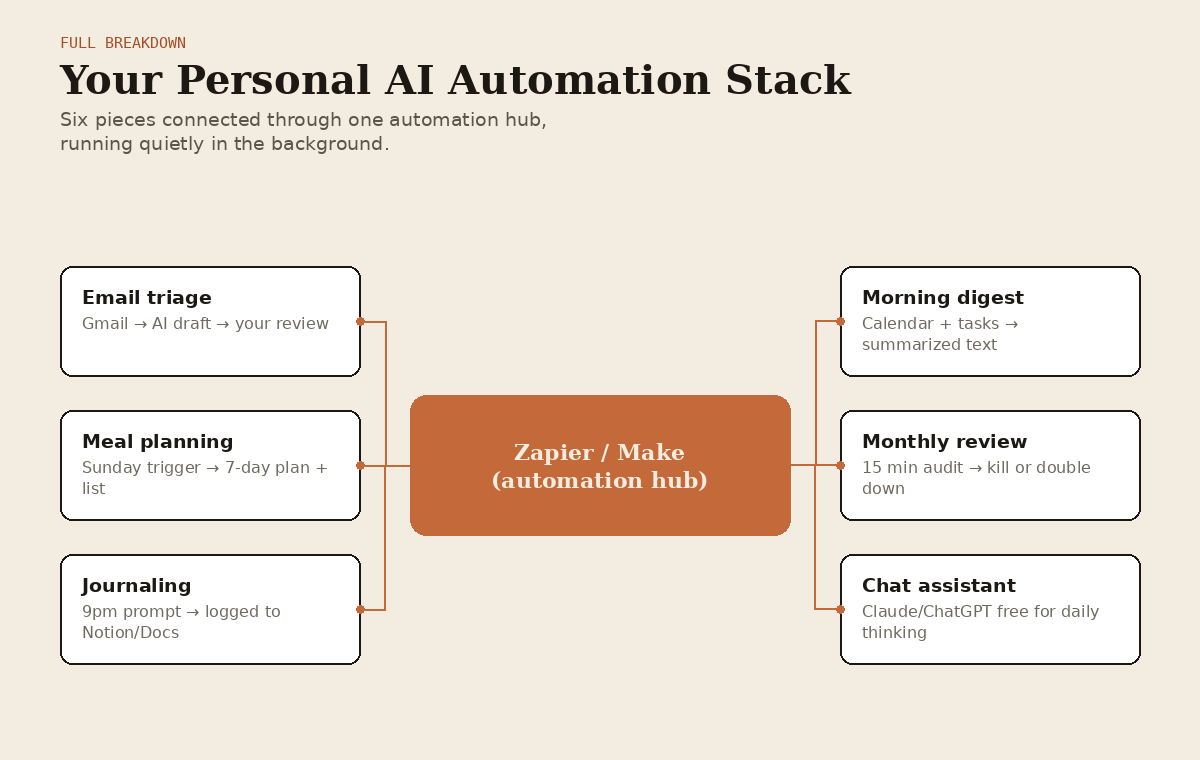
Step by Step Guide: Building Your Personal AI Automation Stack
This is the part most articles skip because it actually requires some setup. But trust me, spending 30-45 minutes doing this once will save you hours every single week going forward. Here's exactly how I'd build this from scratch if I were starting today.
Step 1: Pick your automation hub
You need a tool that can connect different apps together and trigger actions automatically. The two big players are: • Zapier - the most popular, has the most integrations, has a genuinely usable free tier (100 tasks/month) • Make (formerly Integromat) - more powerful visual workflow builder, steeper learning curve, also has a solid free tier
My honest take: start with Zapier if you're new to this, it's more beginner friendly. Move to Make once you outgrow the free Zapier tier and want more complex logic.
Step 2: Set up your "email triage" automation
This alone will change your life. Here's the setup:
Connect Gmail (or Outlook) to Zapier
Create a "Zap" triggered by new emails matching certain criteria (like emails from specific senders, or emails with certain keywords)
Have it pipe the email content into ChatGPT or Claude's API through Zapier's built-in AI actions
Have the AI draft a suggested reply and save it to your drafts folder automatically, OR send you a Slack/text notification with a summary
You just review and hit send instead of reading and composing from scratch
This single automation alone can save the average person 3-5 hours a week if you get a lot of email.
Step 3: Automate your weekly meal planning
Set a Zap to trigger every Sunday morning
Have it call an AI action (ChatGPT/Claude via API, or use Zapier's built in AI features) with a prompt like "generate a 7 day dinner plan based on [your dietary preferences], keep it under [budget], include a grocery list"
Have the output automatically create a note in your Notes app or send to your phone via text/email
Bonus: connect it to Instacart if you want the grocery list auto-populated into a cart
Step 4: Automate your journaling/reflection habit
Set a daily trigger for 9pm (or whenever you wind down)
Have it send you a text or notification with a reflective prompt (you can have AI generate a new, non-repetitive prompt each day based on what you journaled about recently, this is where Rosebud actually already does this natively, so you could just use that instead of building it yourself)
Your reply gets logged automatically into a Notion database or Google Doc that becomes your running journal
Step 5: Set up a "digest" for your calendar and tasks
Every morning at a set time, have a Zap pull your calendar events and any tasks due
Pipe it through an AI action that summarizes your day and flags anything that looks overloaded or conflicting
Send it to yourself as a morning text or notification
Step 6: Review and refine monthly
Automations rot if you never check on them. Once a month, spend 15 minutes reviewing what's actually saving you time versus what you set up and forgot about. Kill what's not working, double down on what is.
That's genuinely it. None of this requires coding. It requires about 45 minutes of setup time and then it just runs in the background making your life measurably easier.
My Honest Personal Experience With All This
Alright, personal opinion time, because I promised I wouldn't just hand you a sterile listicle.
I started using ChatGPT back when it first blew up, mostly for writing help because I was skeptical it could do much else useful. I was wrong about that pretty fast. The thing that actually changed my daily habits wasn't some big dramatic use case, it was small stuff compounding. Asking it to help me figure out what to cook with three random ingredients in my fridge. Having it help me write a text to a friend when I genuinely didn't know how to phrase something sensitive without sounding harsh. Using it to plan a workout split when I got bored of my old routine.
Switching a lot of my daily writing over to Claude specifically was a genuine moment for me. I noticed my texts and emails stopped sounding like they were written by a robot, because honestly, earlier AI output from other tools kind of did read that way if you weren't careful with your prompting. Claude just naturally sounds more like a person when you ask it to help with something personal, and that matters more than people give it credit for.
The automation stuff took me longer to actually set up because, not gonna lie, it felt like overkill at first. Like why would I need Zapier for my life. But once I built the email triage automation specifically, I genuinely could not go back. I get a lot of email for random life admin stuff (bills, appointments, family stuff, side projects) and having drafts waiting for me instead of a blank inbox staring back is a genuinely different experience day to day. It's the difference between dreading opening your inbox and just not dreading it.
Do I think everyone needs a fully automated life? No, honestly, some people will read the automation section and go "that's too much effort for me" and that's completely fine. Even just using the free chat tools manually, without any of the Zapier stuff, puts you ahead of where most people are. But if you're someone who likes systems, who gets a little dopamine hit from things running smoothly in the background, building this out is genuinely worth the Sunday afternoon it takes.
One more honest note: don't fall into the trap of subscribing to five different AI tools because each one has one cool feature. I did this for a while and it was a waste of money. Pick your main chat tool, use its free tier until you actually hit a wall, and only pay when you've genuinely outgrown what's free. Most people never do for daily personal use. Business use is a different story, which brings us to section two.
SECTION 2: BUSINESS TASKS - MAKING YOUR BUSINESS ACTUALLY PROFITABLE
Alright, this is where things get spicy, because this is where AI tools stop being "nice to have" and start being genuinely competitive advantages. If you're running a business, freelancing, or trying to grow a side hustle into something real, the gap between people using AI well and people not using it at all is becoming a genuinely unfair fight.
I'm not going to sugarcoat this: the businesses that figure this stuff out are moving faster, spending less on overhead, and outcompeting the ones that don't. That's not hype, that's just what I've watched happen over the past few years, both in my own work and watching other businesses around me.
Same format as before. Problem, best paid tools, comparison, free options, comparison of the free stuff, and a summary with automation potential at the end of each subtopic area.
- Customer Support and Service
The problem
Customers expect fast answers. You (or your small team) can't be online 24/7. Every hour a customer waits for a response is an hour they might be looking at your competitor instead. And hiring a full support team is expensive, especially for a small or growing business.
The best AI tools for this (paid options)
Intercom's Fin AI Agent is one of the most polished AI customer support tools on the market. It resolves a genuinely high percentage of common support tickets automatically by pulling from your help docs, and it hands off to a human seamlessly when it can't solve something. Businesses report resolution rates in the range that would've required multiple full time support reps a few years ago.
Zendesk AI does something similar if you're already in the Zendesk ecosystem, with AI-powered ticket routing, suggested replies, and sentiment detection that flags angry customers before they escalate.
Crisp and Tidio offer more affordable AI chatbot options that are great for small businesses and e-commerce stores that don't need the full enterprise feature set of Intercom or Zendesk.
Comparing them
• Best for scaling support without hiring: Intercom Fin, it's genuinely the most capable at fully resolving tickets end to end • Best if you're already using a helpdesk system: Zendesk AI, integrates natively • Best budget option with real capability: Tidio, especially for e-commerce • Best for really tight budgets: Crisp's free-to-cheap tiers
Free options
Tidio's free tier includes basic AI chatbot functionality that handles simple FAQ-type questions, genuinely usable for small businesses just starting out.
Chatbase (free tier) lets you build a custom chatbot trained on your own website/docs content, which is honestly impressive for a free tool, you can have a working AI support bot on your site within an hour.
Just using ChatGPT/Claude manually to draft responses to common support emails, while not "automated," is still miles faster than writing every response from scratch, and it's completely free.
Free options comparison
For a small business just getting started, Chatbase's free tier genuinely punches above its weight, being able to train a bot on your own docs for free is a big deal, that used to require real development work. Tidio free is close behind and better if you want live chat with a human handoff built in more smoothly. My honest opinion: don't pay for Intercom or Zendesk's AI features until you're getting enough support volume that manual handling is actually costing you real money or reputation. Most small businesses can run on free tools for the first year or two easily.
- Content Marketing and Social Media
The problem
Content is the engine of modern marketing, but consistently producing good content (blog posts, social captions, video scripts, graphics) across multiple platforms is a full time job by itself, and most small businesses don't have a dedicated content person.
The best AI tools for this
Jasper is built specifically for marketing content at scale, with brand voice training so the output actually sounds like your company instead of generic AI slop. It's genuinely strong for teams producing high volumes of on-brand content.
Claude and ChatGPT remain incredibly strong general purpose options for writing blog posts, captions, and scripts, especially once you've built a good custom prompt or project with your brand voice guidelines saved.
Canva (with Magic Studio AI features) handles the visual side, generating social graphics, resizing content across platforms automatically, and even doing basic video edits with AI.
Opus Clip deserves a specific shoutout, it takes a long form video (like a podcast or webinar) and automatically cuts it into short form clips optimized for TikTok/Reels/Shorts, identifying the "hook worthy" moments using AI. This alone can replace what used to require a dedicated video editor for repurposing content.
Comparing them
• Best for consistent on-brand written content at scale: Jasper • Best flexible general purpose writer (and best value if you're not doing huge volume): Claude or ChatGPT • Best for visuals without a designer: Canva Magic Studio • Best for repurposing long form video into short clips: Opus Clip, nothing else really competes here
Free options
Claude Free / ChatGPT Free for written content, genuinely capable for a solopreneur or small business's regular content needs.
Canva's free tier covers a huge amount of design work, including several AI features, before you'd need Canva Pro.
Opus Clip's free tier gives you limited clips per month but is enough to test whether the workflow is worth it before paying.
CapCut (mentioned in section 1 too) is genuinely a legitimate free business tool for short form video editing, plenty of brands run entire content operations off free CapCut.
Free options comparison
Here's my genuinely controversial opinion: for most small businesses and solopreneurs, free ChatGPT/Claude plus free Canva beats paying for Jasper. Jasper's main advantage is brand voice consistency at scale across a team, which matters if you've got multiple people writing content and need it all to sound the same. If it's just you or a tiny team, you can achieve the same brand consistency by just saving a good style guide prompt and reusing it, for free. Where I'd actually recommend spending money first is Opus Clip if you're doing any long form content (podcast, YouTube, webinars) because the time savings on repurposing are massive and the free tier clip limit will frustrate you fast once you see how well it works.
- Sales, Lead Generation, and Outreach
The problem
Finding the right prospects, personalizing outreach at scale (because generic mass emails get ignored or land in spam), and following up consistently is one of the most time consuming parts of running a business, and it's also one of the highest leverage if you get it right.
The best AI tools for this
Apollo.io combines a massive contact database with AI-powered outreach sequencing, and it's become one of the most popular all in one sales tools for exactly this reason, find leads and reach out to them without switching platforms.
Clay is genuinely one of the most powerful tools out there right now for building hyper-personalized outreach at scale, it pulls data from dozens of sources and uses AI to write genuinely custom first lines for each prospect based on their actual company, not templated mail-merge junk. It's more technical to set up but the results are remarkable when done well.
Instantly.ai and Smartlead focus specifically on cold email infrastructure and deliverability, with AI-assisted copywriting and inbox rotation to keep your emails out of spam.
Comparing them
• Best all-in-one (database + outreach): Apollo.io • Best for genuinely personalized outreach at scale: Clay, but it has a real learning curve • Best for cold email deliverability specifically: Instantly.ai • Best for beginners who want something simple: Apollo.io, easiest onboarding of the group
Free options
Apollo.io's free tier gives you a limited but real number of contact credits and basic sequencing, genuinely enough to test if outbound sales works for your business before committing money.
Hunter.io's free tier for finding email addresses is solid and widely used.
ChatGPT/Claude free for writing your outreach copy manually, which combined with a free lead list tool, replicates a lot of what you'd pay for in an all-in-one platform, just with more manual steps.
Free options comparison
Apollo's free tier is genuinely the best starting point because it combines finding leads AND reaching out to them in one place without cost. Clay doesn't really have a meaningful free tier for serious use, it's built for when you're ready to scale outreach seriously and are willing to pay for the data enrichment. My take: start with Apollo free, and only move to Clay once you've proven outbound works for your business and you want to push personalization further. Don't jump straight to the expensive, complex tool before validating the channel works for you at all.
- Data Analysis and Business Intelligence
The problem
You've got data (sales numbers, website analytics, customer behavior) sitting in spreadsheets or dashboards, but turning that into actual decisions requires either hiring an analyst or spending hours yourself trying to spot patterns in rows of numbers.
The best AI tools for this
ChatGPT's Advanced Data Analysis (Code Interpreter) and Claude with file analysis are genuinely underrated for this. You can literally upload a messy spreadsheet and ask "what patterns do you see, what should I pay attention to" and get real, useful analysis back, charts included, without knowing a single line of code.
Julius AI is built specifically around this exact use case, chat with your data, generate visualizations, run statistical analysis, all through natural conversation.
Tableau's AI features (Tableau Pulse) and Power BI's Copilot integrate AI-generated insights directly into the dashboards larger businesses already use, surfacing anomalies and trends automatically instead of requiring someone to go hunting for them.
Comparing them
• Best for a non-technical business owner just wanting answers from their own data: Claude or ChatGPT with file upload, genuinely no learning curve required • Best dedicated data analysis chat experience: Julius AI • Best for larger businesses already using enterprise BI tools: Power BI Copilot / Tableau Pulse
Free options
ChatGPT Free / Claude Free with file uploads genuinely handle a huge amount of small business data analysis needs at zero cost, this is one of the biggest "hidden in plain sight" free wins in this entire article.
Julius AI's free tier gives limited monthly usage but is enough to test the workflow.
Google Sheets' built in AI features (formula suggestions, "Help me organize" features) are free and increasingly capable for basic analysis.
Free options comparison
Honestly, for a small to mid-size business, free ChatGPT or Claude with file upload might be the single best free business tool in this entire article. The ability to just dump a CSV of your sales data and ask plain English questions and get real charts and insights back, for free, is something that would've required hiring an analyst just a few years ago. I genuinely think most small business owners underuse this. Don't pay for a dedicated data tool until you've hit the limits of just uploading files to a free chat assistant and asking good questions.
- Hiring, HR, and Team Management
The problem

Sorting through resumes, writing job descriptions that actually attract the right people, onboarding new hires efficiently, and managing performance reviews all take a lot of time, and getting any of it wrong is expensive (bad hires are genuinely costly).
The best AI tools for this
HireVue uses AI to help screen and evaluate candidates at scale, useful for businesses hiring in higher volume.
Textio uses AI to optimize job descriptions specifically to attract more diverse and qualified applicants by flagging biased or off-putting language.
ChatGPT/Claude are, once again, genuinely excellent for writing job descriptions, creating interview question banks tailored to a specific role, drafting onboarding documents, and even helping structure performance review feedback in a constructive, clear way.
Lattice integrates AI into performance management and engagement surveys for larger teams.
Comparing them
• Best for high volume hiring screening: HireVue • Best for optimizing job post language: Textio • Best value for small business hiring and HR docs: ChatGPT or Claude, easily • Best for ongoing performance management at a growing company: Lattice
Free options
ChatGPT/Claude free for writing job descriptions, interview questions, onboarding docs, and performance review language, this covers the vast majority of small business HR needs completely free.
LinkedIn's free posting tools combined with AI-assisted resume screening prompts (just ask ChatGPT to help you build a scoring rubric and apply it) can replace a paid applicant tracking system for very small teams.
Free options comparison
For small businesses (under maybe 20-30 employees), you genuinely do not need HireVue or a fancy paid HR AI tool. Free ChatGPT/Claude for writing everything, combined with a simple spreadsheet to track candidates, covers it. HireVue and Textio only start making financial sense once you're hiring at real volume where the time savings compound across dozens or hundreds of applications.
- Finance, Bookkeeping, and Invoicing
The problem
Tracking expenses, sending invoices, chasing late payments, and understanding your actual financial position (not just "do I have money in the bank right now") is a constant background stressor for business owners, especially solo ones.
The best AI tools for this
QuickBooks with AI features auto-categorizes transactions, flags unusual spending, and can even predict cash flow issues before they happen.
Bench combines AI-assisted bookkeeping with actual human bookkeepers reviewing the work, a nice hybrid if you want the speed of automation with a human safety net.
Bill.com uses AI for invoice processing and approval workflows, particularly useful once you've got any kind of team involved in the money side of the business.
Comparing them
• Best all around for small business accounting: QuickBooks with AI features • Best if you want a human to double check the AI: Bench • Best for invoice/bill processing specifically once you have some team involved: Bill.com
Free options
Wave Accounting is completely free and covers invoicing and basic bookkeeping for small businesses, it's genuinely one of the most underrated free business tools that exists.
ChatGPT/Claude free for explaining financial statements in plain English, helping you build a simple budget, or drafting collection emails for late-paying clients.
Google Sheets templates + AI chat for basic financial tracking, free and flexible.
Free options comparison
Wave is genuinely a full replacement for paid invoicing/bookkeeping software for a huge number of small businesses, and it's free. My honest recommendation: use Wave for the actual bookkeeping/invoicing mechanics, and use free ChatGPT/Claude as your "financial translator" to help you actually understand what your numbers mean and what to do about them. You don't need QuickBooks' AI features until your business has real complexity (inventory, multiple revenue streams, a team handling money).
- Project Management and Team Coordination
The problem
Keeping a team (even a small one) aligned on what's happening, who's doing what, and what's blocked is genuinely hard, and status update meetings eat an enormous amount of time that could be spent actually working.
The best AI tools for this
ClickUp's AI features (Brain) can summarize project status, generate task descriptions, and even draft standup updates automatically based on task activity.
Asana's AI features similarly generate smart status summaries and can flag projects that are at risk of missing deadlines based on current pace.
Notion AI again shows up here, genuinely strong for turning meeting notes into action items automatically and keeping a running project wiki organized without manual upkeep.
Comparing them
• Best for task-heavy teams that want automated status reporting: ClickUp Brain • Best for larger, more structured project tracking: Asana AI • Best for teams that live in docs/wikis more than task boards: Notion AI
Free options
ClickUp's free tier is genuinely generous and includes basic AI features for small teams.
Notion's free tier covers small team project management completely, with limited AI usage before requiring upgrade.
Trello (free) combined with a free AI chat assistant for writing task descriptions and summarizing boards manually still gets you most of the value.
Free options comparison
For teams under about 10 people, free tiers of ClickUp or Notion genuinely cover project management needs completely fine. The AI-generated status reports become more valuable as your team and project count grows, so this is a category where I'd say: start free, and let your actual pain point (probably "I'm tired of writing status updates manually") tell you when it's time to upgrade, rather than paying preemptively.
- Coding, Development, and Technical Work
The problem
Building or maintaining a website, app, or internal tool traditionally required hiring developers or spending months learning to code yourself, both of which are expensive in either money or time.
The best AI tools for this
Claude Code and similar agentic coding tools have genuinely changed what's possible for non-technical founders, you can describe what you want built in plain English and get real, working code, with the AI able to run commands, test things, and fix its own mistakes rather than just spitting out a code snippet you have to figure out yourself.
GitHub Copilot remains the standard for developers actually writing code day to day, autocompleting and suggesting code inline as you type, massively speeding up experienced developers rather than replacing the need for them entirely.
Cursor (an AI-native code editor) has become hugely popular for the same reason, it bakes AI assistance directly into the coding workflow in a way that feels native rather than bolted on.
Bubble and Webflow aren't AI coding tools exactly but increasingly use AI to help non-technical people build real web apps and sites through visual builders enhanced with AI generation features.
Comparing them
• Best for non-technical founders who want something built without hiring a developer: Claude Code or a similar agentic tool, genuinely capable of building real, functioning software from a plain English description • Best for professional developers wanting to move faster: GitHub Copilot or Cursor • Best no-code option with AI assistance for simple web apps: Bubble
Free options
Claude's free tier can handle smaller coding tasks and questions, though heavier agentic coding work generally benefits from a paid plan given the compute involved.
GitHub Copilot has a free tier for individual developers with usage limits, genuinely useful for testing if it fits your workflow.
Webflow and Bubble both have free tiers to build and test before you need to pay for hosting/publishing.
Free options comparison
This is genuinely the one category in this whole article where I'd tell you free tiers are more of a "test drive" than a full solution. Real development work, whether AI-assisted or not, tends to need either compute time or hosting that isn't free forever. That said, the free tiers are absolutely enough to validate an idea, build a prototype, or handle small one-off technical tasks before you need to open your wallet. Don't pay for a dev tool subscription until you've got a project that's actually going somewhere.
- Presentations, Pitch Decks, and Proposals
The problem
Whether you're pitching investors, clients, or just presenting internally, building a genuinely good looking, well-structured deck takes real design skill that most business owners don't have, and hiring a designer for every deck isn't practical.
The best AI tools for this
Gamma has become the go-to tool for this specifically, you type an outline or even just a rough prompt and it generates a genuinely polished, well designed presentation, document, or webpage automatically, with an editing experience that's actually pleasant to use afterward.
Beautiful.ai similarly auto-designs slides as you add content, adjusting layouts intelligently so you never end up with an ugly, cluttered slide.
Canva's presentation features with Magic Design round out the top options, especially if you want tight integration with the rest of your brand assets.
Comparing them
• Best overall for fast, good looking decks from a rough idea: Gamma, it's honestly become my default recommendation for this • Best for teams that present often and want consistent design: Beautiful.ai • Best if you're already deep in the Canva ecosystem: Canva Magic Design
Free options
Gamma's free tier lets you create a genuinely solid number of presentations before hitting limits, more than enough for occasional use.
Canva's free tier covers presentation creation completely for small business needs.
Google Slides combined with AI chat for content (ask ChatGPT/Claude to help structure your talking points and slide content, then build it manually) is a fully free path that still produces good results if you're willing to do a bit more manual design work.
Free options comparison
Gamma's free tier is genuinely strong enough that most small businesses and solopreneurs never need to pay for a presentation tool. I've built real client-facing decks entirely on Gamma's free tier and had zero complaints about the design quality. Beautiful.ai's advantage (consistency across a growing deck library for teams) is really only worth paying for once you've got multiple people building presentations regularly and need a shared design system.
Section 2 Summary: Solving Business Problems and Automating Them
Stepping back again: the theme here is actually pretty consistent with section 1, but with one big difference. In business, the ROI on paying for the right tool tends to show up faster and more clearly than in personal life, because time saved or leads generated has a direct dollar value attached to it. That changes the free vs paid calculation somewhat.
Here's the honest framework I'd use:
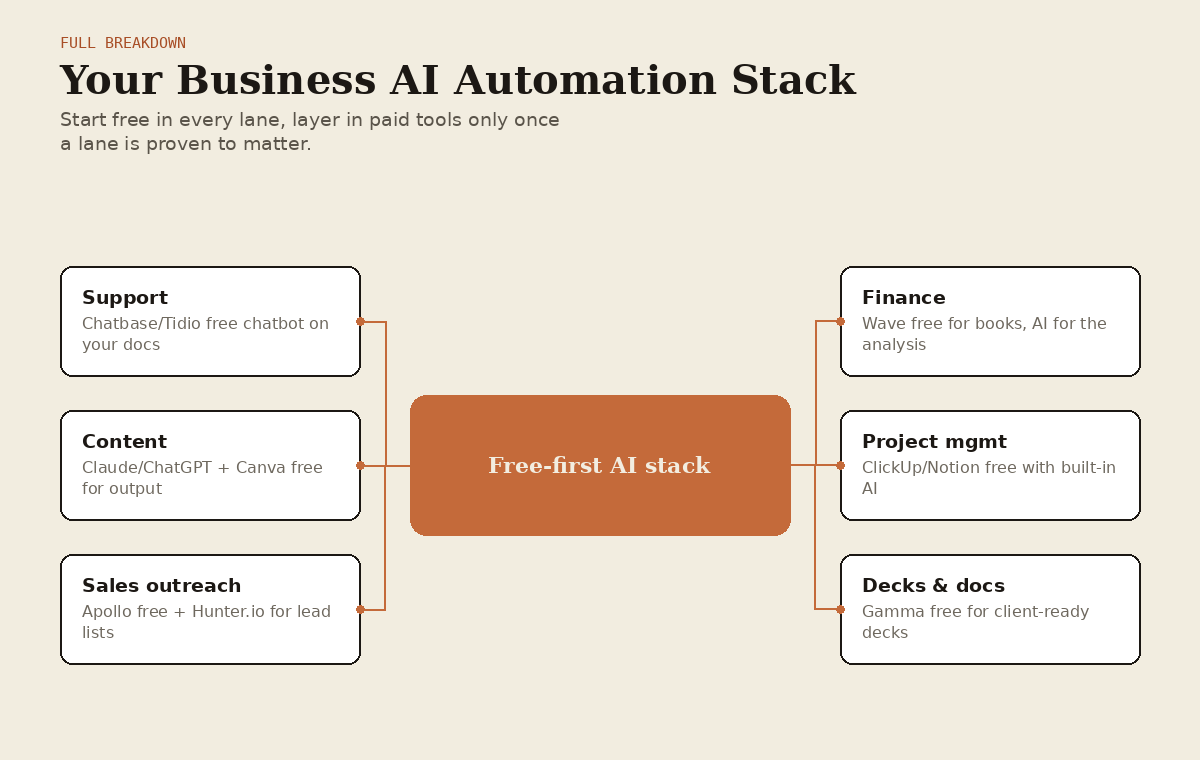
Start every category free. Use Claude/ChatGPT free tiers, Wave for accounting, Chatbase for support, Apollo free tier for sales, Gamma free for decks. Validate that the workflow actually helps your business before spending anything.
Track what's actually saving you time or making you money. Not vibes, actual numbers. If an automation saves you 5 hours a week and your time is worth even $30/hour, that's $600/month of value, a $50/month tool is an easy yes at that point.
Upgrade selectively, not wholesale. Don't jump to the "pro everything" plan across every category at once. Upgrade the ONE category that's your biggest bottleneck first, see the impact, then move to the next.
Where AI genuinely earns paid tiers in business: high volume customer support (Intercom/Zendesk), scaled personalized outreach (Clay), and repurposing long form content at volume (Opus Clip) are the three categories where I've personally seen the clearest, fastest ROI from paying versus staying free.
Step by Step Guide: Building Your Business AI Automation Stack
Alright, let's build the actual system. This is more involved than the personal stack because business automations need to be more reliable (a missed personal reminder is annoying, a missed customer follow-up costs you money), but it's still very doable without hiring a developer.
Step 1: Map your actual bottlenecks before building anything
Don't automate for the sake of automating. Spend 20 minutes honestly answering: where does time or money leak out of my business right now? Common answers: slow customer response times, inconsistent follow-up on leads, content that doesn't get made because there's no time, manual data entry between tools. Pick your top 2-3 bottlenecks, that's what you're building for.
Step 2: Set up your customer support first-response automation
Sign up for Chatbase (free tier) or Tidio
Feed it your FAQ page, past support emails, and product documentation
Embed the chat widget on your website
Set up a fallback rule: if the AI can't answer confidently, it collects contact info and creates a task for you to follow up manually
Review the bot's conversation logs weekly for the first month and correct/retrain it on anything it got wrong
Step 3: Build your lead follow-up automation
Connect your lead source (contact form, Apollo, whatever generates leads for you) to Zapier or Make
Trigger an immediate AI-drafted personalized email response the moment a lead comes in (speed matters enormously here, responding within 5 minutes versus 5 hours dramatically changes conversion rates)

Set up a follow-up sequence (3-5 touches over 2 weeks) that automatically pauses if the lead replies
Have any lead that doesn't convert after the sequence get tagged and moved into a "nurture" list for occasional AI-drafted check-ins
Step 4: Automate your content repurposing pipeline
Record or use existing long form content (podcast episode, webinar, YouTube video)
Run it through Opus Clip (free tier to start) to generate short form clips
Use Zapier to auto-post those clips to your social platforms on a schedule, or at minimum, auto-generate captions using Claude/ChatGPT so you're just hitting approve/post
Use the same source content to generate a blog post and social captions using Claude/ChatGPT, one piece of content becomes five or six pieces of output
Step 5: Set up a weekly business health digest
Connect your key data sources (sales numbers, website analytics, bank account via Wave/QuickBooks) to a central spot, even a simple weekly-updated spreadsheet works
Every Monday, have an automation pull that data and feed it to Claude or ChatGPT with a prompt like "here's this week's numbers versus last week, tell me what's trending well, what needs attention, and what you'd recommend focusing on"
Get that summary delivered to yourself automatically, so you start every week already knowing where you stand instead of digging for it
Step 6: Build in a human review layer everywhere it matters
This is important and people skip it: automation should draft, not always auto-send, especially for anything customer-facing or financial in the early days. Set up your Zaps so AI-generated customer emails, invoices, and outreach messages land in a "review" queue rather than going out completely unsupervised until you've built real trust in the system's accuracy for your specific business.
Step 7: Review monthly, cut what's not working, scale what is
Same as the personal stack, but with real financial stakes now. Look at what's actually driving results (more leads converted, faster support resolution, more content published) versus what you set up and never really adopted. Kill the dead weight, invest more time and money into what's clearly working.
My Honest Personal Experience Running an Actual Business With These Tools
Okay, real talk from actually doing this, not just reading about it.
The single biggest unlock for me personally was the content repurposing pipeline. I used to sit on hours of recorded conversations, podcast-style stuff, that just never turned into anything because editing it down into usable pieces felt like a whole separate job I didn't have time for. Once I actually set up a proper pipeline (record, run through a clipping tool, auto-caption, auto-post), the amount of content I was putting out went up dramatically without me spending more actual hours on it. That's the whole point, more output from the same input of time.
The sales outreach automation was the one that took the most trial and error to get right, and I'll be honest with you about that instead of pretending it was smooth. My first version of AI-personalized cold outreach was genuinely bad, it sounded obviously AI generated and got worse reply rates than when I wrote things manually. The fix wasn't a better tool, it was better inputs. Once I actually fed the AI real, specific research about each prospect instead of just their name and company, the quality of the output completely changed. Garbage in, garbage out is still very much a real thing even with the best AI tools available.
The data analysis stuff genuinely surprised me the most. I did not expect uploading a messy sales spreadsheet to Claude and asking "what am I missing here" to be as useful as it turned out to be. It caught a pattern in my customer churn that I'd genuinely overlooked because I was too close to the day to day to see it from a step back. That's maybe the most underrated use case in this entire section, having something look at your business with fresh eyes on demand, for free, whenever you want a second opinion.
If I'm being fully honest about what didn't work: I over-automated customer support too early. I let the AI chatbot handle more than it was ready for before I'd properly trained it on enough real conversations, and a couple customers got genuinely unhelpful, circular responses before I caught it and fixed the fallback rules. Lesson learned the hard way: start narrow, expand what the AI is trusted to handle only once you've proven it's actually good at the narrow version first. Don't hand it the keys to your customer relationships on day one.
The financial side, using Wave plus AI chat to actually understand my numbers instead of just staring at them, genuinely reduced my stress level around money more than any other single change I made. I'm not a numbers person by nature, and having something translate "here's what actually happened financially this month and here's what it means" into plain English on demand removed a huge amount of low grade anxiety I used to carry around not really knowing where things stood.
WHERE THIS IS ALL HEADED: DEVELOPMENT PROSPECTS
Alright, let's talk about the future for a second, because if you're building habits and workflows around these tools right now, it's worth knowing where the puck is going, not just where it is.
Agents are the next real shift, not just chatbots
Right now, most people (even reading this article) are still using AI tools in a "ask a question, get an answer" loop. That's changing fast. The next wave is genuinely agentic AI, tools that don't just answer you but actually go do multi-step tasks on your behalf. Book the appointment. Research the five competitors and put together a comparison doc. Handle the customer refund request end to end including updating your accounting software. We're already seeing early versions of this (Claude Code doing real development work autonomously, browser agents that can navigate websites and complete tasks) and honestly within the next couple years I expect "I asked my AI to just handle it" to become a completely normal sentence for a huge range of tasks that currently require you to babysit the process step by step.
What this means practically for you: the automation stacks I described above (Zapier connecting things together) are honestly a bit of a bridge technology. In a few years, a lot of that connective work will probably be handled by the AI agents themselves navigating between tools directly, without you needing to manually wire up each connection in Zapier. Worth knowing so you don't over-invest in building a massively complex automation stack when some of that complexity might get absorbed by the tools themselves down the line. Build what saves you time NOW, but don't be afraid to simplify later as the tools get smarter.
Personalization and memory are going to get genuinely wild
The AI tools you use are going to remember more and more about you and your business over time, your writing style, your customers' history, your business's specific patterns, without you having to re-explain context every single conversation. This is already starting (Claude and ChatGPT both have memory features now), but it's early. In a few years, the idea of an AI assistant that doesn't already know your business inside and out is going to feel as outdated as a customer support rep who's never heard of you before calling in feels today.
Multimodal is becoming the default, not the exception
Text-only AI interaction is quickly becoming just one option among several. Voice, video, and image understanding are converging into single tools rather than separate products. Expect a lot more workflows where you just show the AI something (a screenshot, a video of a problem) instead of typing out a description of it. For business specifically, this means things like AI reviewing your actual product photos and suggesting listing improvements, or watching a recording of a sales call and pulling out actionable coaching notes automatically, becoming completely standard rather than cutting edge.
The free vs paid gap is going to keep shrinking for basic tasks, then widening again at the frontier
Here's an interesting pattern I've noticed and expect to continue: whatever the "wow" capability was a year or two ago tends to become available for free pretty quickly as models get more efficient and competition increases. Free tiers keep getting more capable. But at the same time, genuinely new frontier capabilities keep emerging that are initially paid-only. So the advice in this article ("free tools cover most daily needs") is likely to remain true and even become MORE true over time for everyday tasks, while the cutting edge stuff (the most advanced agentic capabilities, the biggest context windows, the most specialized business tools) will keep commanding a premium for people who need to be on the absolute frontier.
Industry-specific AI tools are going to keep multiplying
Right now a lot of the best tools are general purpose. Expect way more genuinely excellent AI tools built for specific niches, legal, medical, real estate, construction, whatever your specific industry is, that understand the particular workflows, compliance requirements, and jargon of that field far better than a general assistant could out of the box. If you're in a specialized industry and haven't found "the AI tool for my specific field" yet, keep an eye out, it's probably coming soon if it doesn't already exist.
Regulation is coming, and it's not necessarily a bad thing
I'd be doing you a disservice not to mention this. Governments around the world are actively working on AI regulation, covering things like data privacy, disclosure requirements (telling customers when they're talking to an AI), and copyright. This is a genuinely contested political topic with real disagreement about the right approach, some people think heavy regulation will slow innovation and hurt smaller companies who can't afford compliance overhead, others think it's necessary to prevent real harms and protect consumers, and reasonable people land in different places on this. What I'd say practically: keep half an eye on regulation in your specific industry and region, because requirements around AI disclosure and data handling are genuinely likely to affect how you're allowed to use these tools in a customer-facing way over the next few years.
On-device AI is going to make privacy-sensitive use cases much easier
A lot of AI right now runs in the cloud, which means your data is going to someone else's server. On-device AI (models that run directly on your phone or computer without sending data anywhere) is improving fast, and this is going to open up a lot of use cases for people and businesses that are currently hesitant about AI tools specifically because of data privacy concerns, particularly relevant for anyone in healthcare, legal, or finance where client confidentiality is a genuinely serious concern, not just a preference.
THE ULTIMATE FREE TOOL CHEAT SHEET (SAVE THIS)
Since I know most people reading a wall of text like this really just want the quick reference version, here's the condensed cheat sheet of every free tool mentioned in this article, organized by what problem it solves. Screenshot this section if nothing else.
Daily life:
General writing/thinking/planning help → Claude Free or ChatGPT Free
Studying your own documents/notes → NotebookLM (free, genuinely amazing)
Open web research → Perplexity Free
Scheduling → Google Calendar + Reclaim.ai free tier
Meal planning → Claude/ChatGPT free + Supercook
Journaling → Rosebud free tier, or just talk to Claude/ChatGPT
Photo/video editing → Canva free + CapCut free
Translation → DeepL free
Language practice → ChatGPT voice mode, free
Finance basics → Cleo free tier, or bank app + Claude/ChatGPT for analysis
Business:
Customer support chatbot → Chatbase free tier or Tidio free
Content writing → Claude Free or ChatGPT Free
Design/social graphics → Canva free
Video repurposing → Opus Clip free tier, CapCut free
Lead generation and outreach → Apollo.io free tier
Data analysis on your own numbers → Claude or ChatGPT free with file upload (seriously, use this)
Hiring docs and HR writing → Claude/ChatGPT free
Bookkeeping and invoicing → Wave Accounting, completely free
Project management → ClickUp free or Notion free
Small coding/technical tasks → Claude free tier, Webflow/Bubble free tiers
Presentations and pitch decks → Gamma free tier
Automation glue: • Zapier free tier (100 tasks/month) to connect everything above • Make.com free tier as you scale up complexity
COMMON MISTAKES PEOPLE MAKE WITH AI TOOLS (DON'T DO THESE)
I've made basically all of these myself at some point, so consider this me saving you the pain I went through.
- Treating every AI tool like a search engine instead of a conversation
The biggest unlock in using these tools well is realizing you can go back and forth. If the first response isn't quite right, don't give up or start over, tell it what's wrong and let it adjust. "That's too formal, make it sound more like me" or "this is close but cut it down by half" gets you dramatically better results than accepting the first draft or abandoning the tool entirely. People who've only used AI tools a handful of times often don't realize how much better the output gets once you actually iterate with it like you'd iterate with a real collaborator.
- Not giving it enough context
"Write me a marketing email" gets you generic garbage. "Write me a marketing email for my [specific type of business], targeting [specific audience], announcing [specific thing], in a tone that's [specific description], keep it under 150 words" gets you something you can actually use with minor tweaks. The quality of what you get out is directly tied to the quality of what you put in, this isn't a limitation of the tools, it's just how they work, the same way a new employee needs context to do good work, not just a one line task description.
- Paying for tools before validating the free version doesn't work for you
I said this throughout the article but it bears repeating as its own point because it's genuinely the number one way people waste money on this stuff. Subscription fatigue is real, and "I might need the pro features eventually" is not a good enough reason to pay for something today. Hit the actual wall first, then upgrade.
- Automating something before you've done it manually enough times to know what "good" looks like
If you don't know what a good customer support response looks like for YOUR business, you can't properly train or review an AI doing it for you. Do the task manually enough times to develop real judgment about quality first, then automate. Skipping straight to automation on a task you don't understand well yourself is how you end up with the customer support disaster I mentioned earlier in my own experience.
- Not fact-checking AI output on anything that matters
AI tools can and do get things wrong, confidently. This matters more for some tasks than others (a wrong meal suggestion is low stakes, a wrong financial figure or legal claim in a customer-facing document is genuinely serious) but the habit of just blindly trusting output without a sanity check is a bad one to build regardless of stakes. Especially for anything involving numbers, dates, specific facts, or claims about people or companies, always verify before it goes out into the world representing you or your business.
- Using one tool for everything instead of the right tool for the job
I get it, it's convenient to just always open the same app. But this article exists because different tools genuinely are better at different things. Using ChatGPT for video repurposing when Opus Clip exists specifically for that, or manually building a presentation in Google Slides when Gamma would do it in two minutes, is leaving real time savings on the table out of pure habit.
- Forgetting that AI tools are collaborators, not replacements for your own judgment
The businesses and people getting the most value out of AI tools right now aren't the ones who've handed over all their thinking, they're the ones using AI to handle the repetitive, time consuming parts so they have more time and energy for the decisions and creative work that genuinely need a human perspective. Don't outsource your judgment, outsource your busywork.
FREQUENTLY ASKED QUESTIONS
Is it worth paying for multiple AI subscriptions at once?
Generally no, at least not starting out. Pick your main general purpose tool (Claude or ChatGPT) and use its free tier until you hit a real wall. From there, add specialized paid tools one at a time, specifically for the categories where you've proven the ROI (support volume, content repurposing at scale, sales outreach personalization at scale) rather than subscribing to something in every category "just in case."
Will AI tools replace jobs?
This is a genuinely contested topic and reasonable people disagree pretty significantly on the specifics. What seems clear from what's happened so far is that AI is changing what specific tasks within jobs look like faster than it's eliminating entire job categories outright, a lot of roles are shifting toward reviewing, directing, and adding judgment on top of AI-generated first drafts rather than disappearing entirely. Some roles and industries are being affected more than others, and the pace of change is a real source of anxiety for a lot of people, which is completely understandable. I'd encourage anyone worried about this to focus on becoming genuinely good at directing and evaluating AI output in their field, that skill seems to be holding its value regardless of how the broader employment picture shakes out.
Is my data safe when I use these tools?
This depends heavily on the specific tool and your specific use case, and it's worth actually reading the privacy policy of any tool you're feeding sensitive business or customer data into rather than assuming. Enterprise tiers of most major AI tools typically offer stronger data handling guarantees (like not training on your data) than free consumer tiers. If you're in a regulated industry (healthcare, finance, legal) or handling genuinely sensitive customer information, this is worth taking seriously rather than just defaulting to the free tier of whatever's convenient.
Do I need to learn to code to build the automations described in this article?
No. Everything described in the step by step guides uses no-code tools (Zapier, Make) specifically because they don't require coding knowledge. If you want to go further and build more custom automations, tools like Claude Code have made it genuinely possible for non-developers to build real software by describing what they want in plain English, but that's a bonus, not a requirement for getting real value out of this article.
How do I know if an AI tool is actually good or just well marketed?
Honestly, free trials exist for a reason, use them. Don't trust a company's own marketing claims about their AI features, actually test the tool on a real task from your own life or business before committing. A lot of "AI powered" features tacked onto existing software are genuinely underwhelming compared to just using a dedicated tool or a general chat assistant well, "has AI" doesn't automatically mean "good at the thing you need."
What's the single best free AI tool mentioned in this whole article?
If I had to pick just one, I'd say the ability to upload your own documents or data to Claude or ChatGPT and just ask questions about them, whether that's a messy business spreadsheet, a long contract you don't want to read in full, or your own notes for studying. It's free, it's simple, and it applies to an enormous range of both personal and business problems. If you take away one single habit from this entire article, make it that one.
INDUSTRY-SPECIFIC PLAYBOOKS
Generic advice only gets you so far. Let's get specific. Here's how I'd build an AI stack if I were in each of these situations.
If you run an e-commerce store
Your biggest time sinks are usually product descriptions, customer questions about orders, and figuring out what to actually promote. Here's the play:
Use Claude/ChatGPT to batch-write product descriptions from a simple spec sheet, feed it the product specs and a couple examples of your brand voice, and generate descriptions in bulk instead of writing each one individually
Set up Tidio or Chatbase (free) trained on your shipping policy, return policy, and FAQ, this alone kills a huge chunk of repetitive "where's my order" type messages
Use Claude/ChatGPT with file upload on your sales data monthly to spot which products are trending, which are dying, and what bundles might make sense, this is the free data analysis trick again and it's genuinely gold for inventory decisions
Use Canva's AI background removal and Magic Studio for product photography touch-ups instead of paying a photographer for every single product shot
Automate abandoned cart emails with AI-personalized subject lines based on what was actually in the cart, most e-commerce platforms (Shopify, etc.) have this baked in or easily connected via Zapier
If you're a freelancer or solo consultant
Your biggest constraints are time (you're the only one doing the work) and the sales/admin side eating into billable hours.
Use Claude/ChatGPT to draft proposals from a template plus the specific client details, cutting proposal writing time from an hour to about ten minutes
Use Wave for invoicing, completely free, set up recurring invoices for retainer clients so you're not manually billing every month
Use Gamma to build client-facing decks and reports fast, this is a genuine differentiator, showing up with a polished deck when you're competing against other freelancers who show up with a plain document makes a real impression
Automate your intake process: a simple form connected via Zapier that uses AI to summarize a new lead's needs and draft an initial response, so you're not starting every potential client conversation completely cold
Use an AI journaling/reflection tool weekly to actually track what's working, what's draining you, and adjust your workload before burnout happens, solo work makes it easy to just grind without checking in on yourself, don't let that happen
If you run a local service business (contractor, salon, gym, clinic, etc.)
Your biggest opportunities are usually appointment scheduling, review generation, and local marketing, none of which need to be complicated.
Set up an AI chatbot (Tidio free tier works fine) to handle appointment booking questions and basic FAQ on your website so people can get answers outside business hours
Use Claude/ChatGPT to draft review request messages sent automatically after a completed service, personalized based on what service they received, more reviews genuinely drives more local business than almost anything else you can do
Use Canva to create consistent social posts for local promotions, seasonal specials, and behind the scenes content, batch a month of content in one sitting using AI to generate the captions
Use Google's AI features in your Business Profile to respond to reviews faster and more thoughtfully, this matters more than people think for local search ranking
If you take a lot of phone calls, look into AI call answering/transcription tools that are increasingly affordable, so you're not losing leads to voicemail during busy hours
If you're a content creator or coach
Your business runs on your personal brand and your ability to consistently produce content, so your AI stack should be built entirely around amplifying output without diluting authenticity.
Record long form content (podcast, coaching calls with permission, webinars) and run it through Opus Clip to generate short form content automatically, this is genuinely the highest leverage move in this entire playbook for creators specifically
Use Claude/ChatGPT to turn each long form piece into a blog post, a newsletter, and a handful of social captions, one recording becomes a week of content
Use NotebookLM to build a knowledge base of your own past content, then when you're stuck on what to create next, ask it what themes you've covered and what gaps exist, this keeps your content fresh instead of repeating yourself without realizing it
Automate your email newsletter draft generation from your week's content using Zapier plus an AI writing step, then review and personalize before sending, don't fully automate the send on anything this personal to your brand
Be transparent with your audience about where you use AI in your process, audiences generally respond well to honesty about this and poorly to feeling like they've been fooled by fully AI-generated content presented as fully human
If you run an agency
Your biggest challenge is usually consistency across a team and scaling client output without scaling headcount proportionally.
Use Jasper (paid, but worth it here specifically because of brand voice training across multiple clients) to maintain distinct, consistent voices for each client account without your writers having to mentally context-switch constantly
Use Clay for scaled, genuinely personalized outbound if new business development is a priority, agencies live and die by pipeline and this is where the investment pays off fastest
Build a shared prompt library in Notion for your team, so good prompts that work well for specific client tasks get reused instead of everyone reinventing them, this compounds in value as your team grows
Use ClickUp or Asana's AI status reporting features to cut down on internal status meetings, client-facing agencies waste enormous amounts of billable time on internal syncs that AI summaries can mostly replace
Set clear internal guidelines about what AI-generated work gets reviewed by a human before going to a client, and what level of AI involvement gets disclosed to clients, this protects both quality and trust as adoption increases across your team
HOW TO ACTUALLY TALK TO AI TOOLS SO THEY UNDERSTAND YOU
This deserves its own section because it's genuinely the skill that separates people getting mediocre results from people getting great results, and it's not complicated, it just takes a little practice.
Give it a role
Starting a prompt with "you are an experienced [whatever]" genuinely changes the quality and framing of the output. "You are an experienced copywriter who specializes in direct response email marketing" gets you different, better output than just "write me an email."
Give it examples
If you have an example of writing you like (your own past work, a competitor you admire, whatever), share it and say "match this style." AI tools are genuinely excellent at pattern matching from examples, way better than trying to describe a style in the abstract.
Tell it what NOT to do
"Don't use corporate jargon" or "avoid making this sound like a typical AI-generated LinkedIn post" or "don't use bullet points, write it as flowing paragraphs" are all genuinely useful constraints that improve output quality by ruling out the generic default patterns.
Ask it to ask you questions
If you're not sure what details would help, just say "ask me clarifying questions before you start" and let the AI figure out what it needs to know. This flips the dynamic in a genuinely useful way, instead of you guessing what context matters, it tells you.
Iterate instead of restarting
Covered this above but it's worth repeating in this section specifically: "make it shorter," "make it punchier," "this part is good but the ending is weak, try again on just that," all of these get you to a better final result faster than typing a whole new prompt from scratch every time.
Give it real constraints
Word counts, deadlines, budgets, specific numbers, whatever real world constraints exist for the task, share them. "Under 200 words" or "we have a $500 budget for this" produces genuinely more useful output than leaving those constraints for the AI to guess at or, worse, for you to have to manually trim afterward.
Save what works
Most tools (Claude Projects, ChatGPT Custom GPTs and Projects) let you save context, instructions, and files that persist across conversations. Set this up once for your recurring tasks (your brand voice guidelines, your business context, your writing style preferences) and you stop having to re-explain yourself every single time you open a new conversation. This alone probably saves the average regular user dozens of hours a year in repeated context-setting.
BUDGET BREAKDOWN BY BUSINESS SIZE
People always ask me "okay but how much should I actually be spending on this stuff." Here's my honest, real world answer broken down by stage.
Solo / just starting out ($0-50/month)
Run almost entirely on free tiers. Claude or ChatGPT free, Wave for accounting, Canva free, Gamma free, Chatbase free for basic support. If you spend anything, put it toward Zapier's cheapest paid tier once you outgrow the free task limit, that's usually the first genuine bottleneck at this stage.
Small team, real revenue coming in ($100-500/month)
This is where I'd start layering in paid tiers strategically. Claude Pro or ChatGPT Plus for the team's daily use. Apollo.io's paid tier if outbound sales is working. Opus Clip's paid tier if content repurposing is proving its worth. Maybe Zapier's mid tier plan as your automations multiply. Resist the urge to add everything at once, add the next thing only once you've clearly outgrown what's free in that specific category.
Growing business with a real team (10+ people) ($500-2000+/month)
Now the calculus shifts more toward tools that maintain consistency and quality across a bigger team: Jasper for brand-consistent content at scale, Clay for scaled personalized outreach, Intercom or Zendesk AI for support volume that's genuinely beyond what a free chatbot can handle well, ClickUp or Asana's higher tiers for cross-team project visibility. At this size, the AI tool spend should be a genuinely small fraction of what you're saving in headcount you didn't need to hire or time you didn't need to spend, if it's not, something's off and worth re-evaluating.
COPY-PASTE PROMPT LIBRARY (STEAL THESE)
Here's a stash of ready-to-use prompts across both categories. Copy, tweak the bracketed parts, and go.
Daily life prompts:
"Help me write a reply to this email. The tone should be [friendly/professional/firm], keep it under [X] sentences, and make sure to address [specific point]. Here's the email: [paste]"
"I have these ingredients: [list]. Give me 3 dinner ideas I can make in under 30 minutes, with a rough recipe for each."
"Build me a workout split for [X] days a week, focused on [goal], assuming I have access to [equipment/gym type], and I'm at a [beginner/intermediate/advanced] level."
"Explain [topic] to me like I'm smart but have zero background in this field. Use an analogy if it helps."
"Ask me 5 reflective questions about my day before I journal, based on what I've told you has been on my mind lately: [context]."
"I need to say something difficult to [person/relationship]. Here's the situation: [context]. Help me figure out how to say it kindly but clearly."
"Give me a week of dinner ideas for a family of [X], budget conscious, with a combined grocery list organized by store section."
Business prompts:
"You are an experienced copywriter. Write a marketing email for [business type] targeting [audience], announcing [thing], tone should be [description], under [X] words."
"Here's my sales data for the last [timeframe]: [paste/upload]. What patterns do you notice, what should I pay attention to, and what would you recommend I focus on next?"
"Write a job description for a [role] at a [company type/size]. Include responsibilities, required qualifications, and a compelling first paragraph that would make a good candidate want to keep reading."
"Draft a follow-up email sequence (3 emails over 2 weeks) for a lead who [context on where they are in the process], keep each one short and add a clear single call to action."
"You are an experienced customer support lead. Here's a customer complaint: [paste]. Draft a response that acknowledges the issue, offers a resolution, and keeps the tone warm but professional."
"Turn this outline into a full presentation script, roughly [X] slides, aimed at [audience type], with a clear narrative arc: [paste outline]"
"Review this proposal for a potential client and suggest improvements to make it more persuasive without being pushy: [paste proposal]"
"Summarize this meeting transcript into clear action items, who owns each one, and any deadlines mentioned: [paste transcript]"
"I'm hiring for [role]. Here are 5 resumes: [paste/upload]. Help me build a scoring rubric based on [priorities] and rank these candidates against it."
"Explain this month's financial statement to me in plain English, and flag anything that looks unusual compared to a typical healthy business at my stage: [paste/upload]"
A QUICK WORD ON GETTING STARTED WITHOUT OVERWHELM
If you've made it this far, you might be feeling a little overwhelmed by how much is in this article. That's completely normal, and honestly, that's on me for going this deep. Here's the thing though: you do not need to implement all of this at once. Nobody does. Not me, not anyone actually running a business well with these tools.
Pick ONE thing from Section 1 that solves a problem you personally feel every day. Not the coolest one, the one that actually annoys you regularly. Set it up this week. Use it for two weeks. Then pick the next one.
Same for Section 2 if you're running a business. Pick your single biggest bottleneck, the thing that if it disappeared tomorrow would genuinely change how your week feels, and build that automation first. Get it working well before adding the next one.
This stuff compounds. Six months from now, having added one small improvement every couple weeks, you'll look back at how you used to handle things and genuinely not understand how you had the patience for it. That's not an exaggeration, that's just what happened to me, and it's what happens to basically everyone who actually sticks with building this out gradually instead of trying to overhaul everything overnight and burning out on the setup before getting any of the benefit.
FINAL THOUGHTS
Look, I know there's a lot of noise out there about AI right now. Some of it's overhyped nonsense from people trying to sell you a course. Some of it's doom and gloom that doesn't match what's actually happening on the ground. The truth, as usual, is somewhere in the middle and honestly a lot more boring and practical than either extreme wants you to believe.
These tools are genuinely useful. Not magic, not going to run your entire life or business for you while you do nothing, but genuinely, measurably useful for a huge range of the small and medium sized frictions that eat up your time and energy every single day. The people getting the most value out of them aren't geniuses or early adopters with some special insight, they're just people who tried things, kept what worked, dropped what didn't, and built up a system gradually over time.
That's genuinely all this article is asking you to do. Start small. Use the free stuff first. Pay for something only once you've proven you need it. Automate the boring repetitive stuff so you have more energy left for the parts of your life and business that actually need a human brain and a human heart behind them.
Go build something. You've got everything you need in this article to start today, for free, in the next ten minutes if you want to.
Good luck out there.
Links
Related articles

The $1,000/hour Solo AI business (Full Course)
The AI business you can start this week with no audience, no capital, and no code

The New $10,000 AI Product Is Not an App. It’s a Workflow Claude Can Run
Most people building with AI are still trying to make another app. They take a model everyone can already access, place it behind a cleaner interface, add billing, authentication and a dashboard, the…

8 SEO Link-Building Tactics Automated With Claude
📢 If you want more high-quality backlinks but