How to Create Loops with Claude
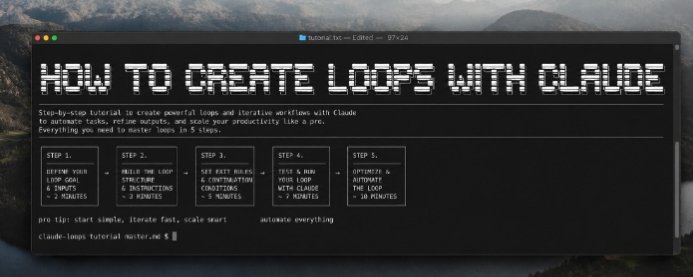
AI is great at answering questions. But the real magic happens when it can think, improve, and repeat tasks automatically.
That's where loops come in.
Instead of writing a prompt, getting one response, and starting over, you can build a workflow where Claude evaluates its own output, fixes mistakes, and continues until it reaches your goal.
This turns Claude from a chatbot into a system that can handle complex tasks with minimal supervision.
What Is a Loop?
A loop is an iterative workflow where Claude repeatedly performs a task until a condition is met.
The basic flow looks like this:
Input → Generate → Evaluate → Improve → Repeat → Final Output
Rather than accepting the first answer, Claude continuously refines it.
For example:
Write an article.
Check for weak sections.
Rewrite those sections.
Repeat until the article meets your quality standard.
The result is usually far better than a single prompt.
Step 1: Define Your Goal
Every loop starts with a clear objective.
Ask yourself:
What should Claude accomplish
What does success look like
When should the loop stop?
A vague goal creates vague results.
Instead of:
"Write something about AI."
Try:
"Write a 1,200-word article explaining AI agents for beginners with practical examples."
Specific goals make every iteration more effective.
Step 2: Build the Loop Structure
A simple Claude loop follows four stages:
1.Generate an initial response.
2.Review the response.
3.Identify weaknesses.
4.Rewrite the weak sections.
You can repeat this process as many times as needed.
Each iteration should improve accuracy, clarity, or creativity.
Step 3: Set Exit Rules
Without stopping conditions, loops can continue forever.
Common exit rules include:
No major issues remain.
Maximum number of iterations reached.
Output meets predefined quality criteria.
User approval is received.
Having clear exit rules keeps workflows efficient and predictable.
Step 4: Test and Refine
Run your loop on different tasks.
Try it with:
Blog articles
Marketing copy
Research summaries
Coding projects
Documentation
Business proposals
Watch where the workflow struggles.
Then adjust prompts, instructions, or evaluation criteria to improve future iterations.
Step 5: Automate the Process
Once your loop works consistently, automate it.
Claude can become part of larger workflows where it:
Reviews documents before publishing.
Improves generated code.
Refines customer support responses.
Creates multiple drafts automatically.
Iterates until quality standards are met.
Instead of manually prompting Claude every time, the workflow handles repetitive refinement for you.
Best Practices
To build reliable Claude loops:
Keep each step focused on one task.
Give Claude clear evaluation criteria.
Limit unnecessary iterations.
Save intermediate outputs when needed.
Test with different inputs before deploying at scale.
Small improvements compound over multiple iterations.
Common Mistakes
Many people create ineffective loops because they:
Start with vague instructions.
Never define stopping conditions.
Ask Claude to evaluate everything at once.
Ignore feedback between iterations.
Optimize too early before testing.
A well-designed loop is simple, measurable, and repeatable.
Final Thoughts
Claude loops are one of the easiest ways to unlock more value from AI.
Instead of treating Claude as a one time assistant, you create a system that continuously reviews, improves, and optimizes its own work.
The best workflows aren't built on better prompts alone they're built on better iterations.
Master loops, and you'll spend less time rewriting outputs and more time shipping high-quality work.
Links
Related articles

I Brutally Modified My Front-End Design Skill ~ Now My UIs Don’t Look Like AI Crap
To create a custom Claude skill, navigate to Customize > Skills in your Claude interface, click the + button, and select + Create skill

claude for research, grok for funnels = $22k/m info beast
everyone using AI wrong, treating all models like they're interchangeable, asking chatgpt to do everything from research to copywriting to funnel building to customer service, getting mediocre output…

How to Actually Set Up Claude Projects That Most Users Don't Know - Full course
Most people use Claude like a search bar.