How to make a few more million dollars selling peptides (The Complete Guide)

Spending $0-$50,000+ a DAY in less than 14 days on Google ads and scaling the LARGEST peptide companies in the space.
This is my entire playbook; store setup, payment processing, Google Merchant Center approval, ad creative strategy, secret shopper defense, and the compliance framework that keeps accounts alive.
This guide would have saved hundreds of thousands in mistakes if it existed five years ago.
Disclaimer: This article is not a recommendation to break rules or sell products illegally. Everything here is based on experience operating in regulated advertising verticals. Use this information with caution and at your own risk. Consult legal counsel before making business decisions around compliance. This is what works what you do with it is on you.
Few things about me first,
Currently running and scaling a leading mens telemed and went from
$33M->$110M in 12 months.
This is built on managing tens of millions of MY own ad spend across healthcare, supplements, peptides, and high-risk ecommerce.
The Basics: Shopify or Woocommerce
First thing. You can sell peptides on Shopify. You cannot sell peptides on Shopify Payments, Stripe, or PayPal. Those accounts will get banned. It is not a matter of if, it is when. And when that happens, the merchant gets match listed, which is essentially a death sentence for processing history.
The longevity of how long a store can operate on Shopify depends on how aggressive the operation is, but it is a ticking clock no matter what.
The right way to do this: WordPress and WooCommerce.
WooCommerce offers the most flexibility over the store and most of the high-risk processors are simple plugins that are exclusive to WooCommerce. They do not work via NMI or other generic gateways. WooCommerce is the standard in this space for a reason.
Processing: The Biggest Bottleneck
Payment processing will be the biggest bottleneck no matter what. If things go wrong, the consequences are serious:
BRAM fines (Visa and Mastercard's Brand Risk and Acquirer Monitoring programs)
Secret shoppers banning MIDs
Getting match listed one of the worst things that can happen to a merchant
More on secret shoppers later. Just understand that processing is the foundation. Get it wrong and nothing else matters.

Setting Up the Store
When building the WooCommerce store, there are a few options:
Find a template and customize it
Use Claude or another AI to help build pages
Hire a developer on Upwork or Fiverr that specializes in WooCommerce
If hiring someone, stay on top of them. Developers in this space can be slow, and some will siphon traffic to their own offers. Always check for leaks. Check every link, every redirect, every script running on the site.
After the basic store is set up and the 5-10 plugins WooCommerce requires to function properly are installed, it is time to audit the site for compliance. This is where most people fail.
Compliance: The Part Everyone Skips (And Pays For Later)
This is the most important section of this entire article. If the site is not compliant, every ad platform will ban it, card networks will issue fines, and processing will get pulled. Here is the full breakdown.
Product Naming
Let's say the catalog is 10-60 products. The store is selling products like retatrutide and others that now require script certifications. There are loopholes around it. Is selling reta on ads without certifications recommended? No. But this guide covers how to do it, what to avoid, and what works.
You cannot directly call it "Reta" or "Retatrutide" in the product feed. It needs to be either misspelled or abbreviated something like "RTA 10MG" or "GLP-3 RTA." This way the product can still show to customers through Google Shopping ads and to show it to customers, you can run a performance max campaign that is feed only, select the "reta" product, single it out then create audience segments and signals based on people searching for reta based search terms, just use runads ai for this but more on that later.
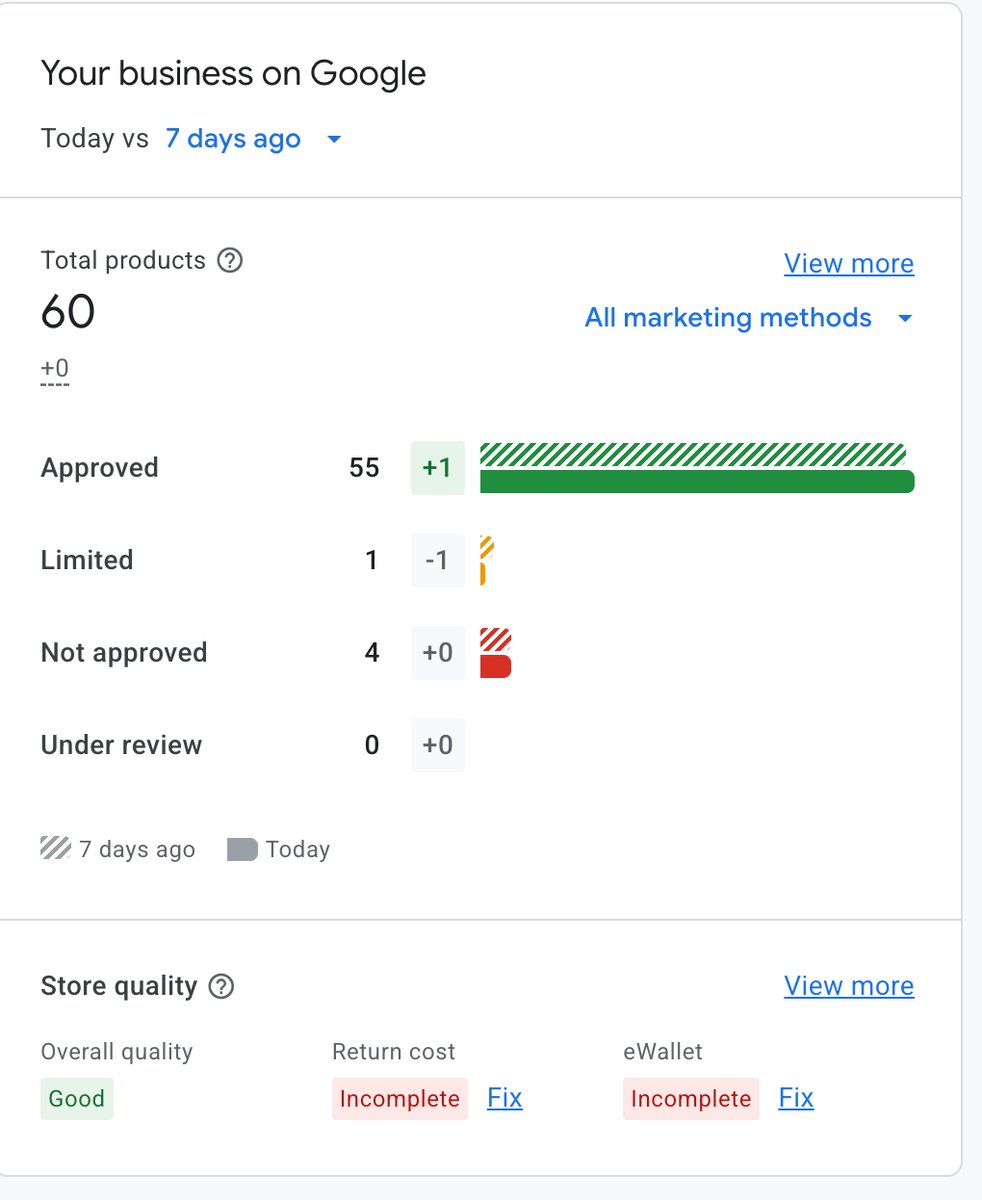
Look at the images below. This is a real Google Merchant Center with a 95% product approval rate. Every product is approved except for the ones literally named "Reta" because the name is flagged. Rename it, the product gets approved. It is that simple.
I wanted to show literal proof for those non believers.
GMC product list showing approved peptides like N-Acetyl Selank, LL-37, Livagen, Klow Blend, Kisspeptin-10, Ipamorelin, GHK-Cu]
GMC product list showing approved peptides like TB-500 Fragment, TB-500, SYN-AKE, Semax, Regeno Blend, NAD+ products]
GMC product list showing approved peptides like tesamorelin, Selank, L-Glutathione, AOD-9604, ACE-031, Vesilute, Thymagen, tsamorelin]
GMC product list showing BPC-157 blends approved, SS-31 approved, but Reta 10mg GLP-3 and Reta 20mg GLP-3 marked "Not approved"]
See that? BPC-157, TB-500, GHK-Cu, NAD+, Kisspeptin, Ipamorelin all approved. Reta not approved as an example because it is literally named "Reta." Rename it, it gets approved.
60 products. 55 approved. 1 limited. 4 not approved (the ones named Reta). Store quality rated "Good" by Google. This is what a properly set up GMC looks like.

Page Crawlers and How They Work
Google and Meta have page crawlers or "automated bots" that scan sites to approve or reject ads. This traffic comes from Council Bluffs, Iowa. These bots get sent to the site during the review process.
To avoid suspension from crawlers:
Strip all metadata and alt text from product images so crawlers cannot pick up restricted product names
Do not put restricted products on the home page. Keep them inside collections that are harder for bots to navigate to
Meta scans the landing page the most. Google scans all pages. Make sure restricted product names are not anywhere visible to crawlers
The Image Trick - title masking
Here is an alternative approach that works well. Name a product generically in the product title like "GLP-3 10mg" but then somewhere on the product page, include a PNG or SVG image that displays the actual name "Retatrutide."
This works because:
Customers can clearly see the real product name
Crawlers cannot read text inside images (no crawlable data)
The product title stays compliant for ads
Secret Shoppers: What They Are and How to Defend Against Them
Companies like Amex, Visa, and Mastercard employ "secret shoppers" both automated API checks and actual humans who go online, browse sites, attempt purchases, and report back. If the site is not following the rules, they will shut down MIDs and issue fines up to $500,000 per merchant.
How to Gate the Site and mitigate secret shoppers
The site needs to be gated. Here is the recommended approach:
Layer 1: Age verification pop-up. The moment someone lands on the site, they need to confirm they are 21 or older before they can see any content. This is non-negotiable.
Layer 2: Account creation before purchase. Let customers browse the catalog, add items to cart, and go through the checkout flow normally. But in order to actually complete a purchase, they must create an account. This is the "gate" that deters most secret shoppers and satisfies the requirements from the acquiring bank.
Some brands gate the entire site, visitors have to create an account, verify as a researcher, and get approved before they can even see the product catalog. This works but creates a lot of friction. The better approach: normal shopping experience with a 21+ pop-up, then account creation required at checkout. ID verification can be added down the line as an additional layer.
The goal is to make the buying process just friction-heavy enough to deter secret shoppers while keeping it smooth enough for real customers.
Running Ads: Meta and Google
Creative Guidelines
Keeping ads compliant is honestly easy if these rules are followed:
Only feature basic, approved products in ad creatives. Do not put restricted products in ads. Ever.
Use limited-time offers (OTOs) to drive urgency
Get creative with ad copy. Long-form text advertorials loaded with information work well send traffic to the landing page or all-products page
Bundle products together and send researchers to a landing page rather than singling out individual ingredients
Curate each ad specifically for each ingredient when going the precision route one ad per product with custom creatives
The best approach for volume is bundling. Create a bundle offer, write an advertorial-style ad with real information, and send traffic to a landing page where customers can browse and shop.
Do not put script products or restricted peptides inside ads. Running an ad specifically for reta will instantly ban the account and the entire ad profile. Then someone has to chase down Meta reps to get another account suspension lifted. Do not be that person.
Google Merchant Center: The Deep Dive
Most people in this space do not know how to actually get their GMC approved. Here is the full breakdown.
GMC (Google Merchant Center) is the platform every advertiser needs in order to run Shopping ads alongside their Google Ads account. Shopping ads are an absolute goldmine right now for peptides. When products show up in the Shopping carousel with images and prices, conversion rates are significantly higher than standard Search ads.
What is Needed for GMC Approval
Google tells you exactly what is needed. It is not a secret:
Store information visible in the footer
Phone number
Physical store address
Privacy policy
Shipping policy

Terms of service
Refund and return policy
Put all of this in the footer. Every page.
Getting Products Approved
Setting up GMC is straightforward:
Add all the necessary policies to the site
Make sure no prohibited products are explicitly named anywhere on the site that is visible to page crawlers
Submit for review
Wait 1-4 days for approval
Someone experienced can get everything approved in a few hours. But even starting from scratch, following the steps above will get it done.
One more thing: if anyone charges for "GMC unbans" it is a scam. The information is freely available. Google tells you exactly what to fix. Nobody needs to pay for that.
Shameless Plug (But Actually Valuable)
RunAds.ai is an AI-powered Google Ads platform that manages campaigns with minimal input. New and existing advertisers get up to $6,000 in Google Ads credits just for creating an account through the platform. Reply or DM for the link.
Maximizing Revenue: Upsells and AOV
Making serious revenue in this space requires full control over the customer journey. That means upsells. Lots of them.
Pre-Purchase and In-Cart Upsells
Bacteriostatic water
Syringes and supplies
Related products and bundles
Post-Purchase Upsells

2-5 upsell offers after checkout
2-5 downsell offers for customers who decline the upsells
Stack offers (buy the peptide, get the reconstitution kit at a discount)
The AOV (average order value) for a well-run peptide brand is $400-$800. With solid pricing and a real upsell flow, large orders come in consistently. Some of the biggest brands in this space are doing insane volume because they nailed their post-purchase flow, not because they have more traffic than everyone else.
Recap: The Full Checklist
Platform: WordPress and WooCommerce. Not Shopify with Stripe/PayPal.
Processing: High-risk processor that plugs into WooCommerce. This is the foundation.
Site compliance: All policies in footer, no restricted product names visible to crawlers, metadata stripped from images.
Product naming: Use abbreviations or generic names for restricted products. Keep the real name in non-crawlable image formats if needed.
Age gate: 21+ pop-up on site entry. Account creation required before purchase.
GMC setup: All policies present, clean product feed, 1-4 day review.
Ad creatives: Only approved products in ads. Bundle offers. Long-form advertorial copy. No restricted products in creatives. Ever.
Upsell flow: Pre-purchase supplies, 2-5 post-purchase upsells, 2-5 downsells. Target $400-$800 AOV.
Secret shopper defense: Gated checkout, age verification, account creation barrier.
Follow this and the result is a compliant, profitable peptide brand running on Google Ads without constantly looking over your shoulder.
Questions? or want me on as an advisor? feel free to reach out to me and I'll see what we can do together.
Links
Related articles
One Shopify store hit $91,340/month by using Claude as the operator, not the writer.
Shopify + Claude is not about product descriptions.
One Shopify store hit $91,340/month by using Claude as the operator, not the writer.
Shopify + Claude is not about product descriptions.

How to get more out of your AI agents...
the intelligence of frontier models is not a bottleneck & it hasn't been for a while...