How to Run TikTok Ads for Mobile Apps: The Complete No-BS Guide

> Are you a brokie? Do you want to escape the permanent underclass?
Running TikTok ads will increase your surface area for luck. You may burn $500, you may create generational wealth, you're guaranteed to learn.
This is everything I wish I had known to get started.
It'll save you days of work, if not a week.
Running ads without tracking is throwing away money; we need to tell TikTok who is most likely to pay for our app!!
> DISCLAIMER: THIS IS THE BORING TECHNICAL SETUP. FOR AD STRATEGIES OR PRODUCT ADVICE, CHECK OUT THE GOAT @athcanft.
1: Ads Account Setup (FREE MONEY 💰)
> READ THIS: If you want to target a US audience!!
This led me to days of non-trivial debugging & headache.
When you first sign up for your account, set your country to the US!!!

Your country changes where you're allowed to target.
UK accounts are not allowed to target the US. You can see the full list here.

Do you like free money? Great 💸
On new accounts, TikTok matches your ad spend up to 6k. This is auto-applied on new accounts but if it doesn't appear, reach out to customer support. Worse case, just create a new account.

2: Technical Setup (For any framework 💻)
> Frameworks matter & need to be uniquely handled. Your events won't fire otherwise! This is where most people get stuck.
-
Go to "Events Manager" within TikTok Business Center.
-
Connect a new data source.
-
Choose "App".
-
Paste link to your ios app store listing.
-
For connection method, choose "TikTok SDK".
> You can also use an MMP (Mobile Measurement Partner). These are good if you're running ads across multiple channels or spending a looot on ads. They act like an aggregator: your app sends them events, and the MMP forwards them to TikTok. For our purposes, it's quicker to just use the TikTok SDK. But they're effectively identical for the functionality of ad tracking.
- You'll be given some ids, note them down for the next step.
-
App ID
-
TikTok App ID
-
App Secret
-
Ignore the installation steps (we're not wasting time hand writing code).
-
Give this prompt to your agent (rare lore: yaml prompts are 3x effective):
task: "Set up TikTok App Events SDK for iOS app install tracking"

context:
  app_uses: "RevenueCat for subscriptions"
  attribution_setup: "TikTok App Events SDK, not an MMP"
  source_of_truth: "RevenueCat remains the source of truth for subscription status"
  assumption: "TikTok app setup is already complete in TikTok Events Manager"
  docs_to_read:
    - "https://business-api.tiktok.com/portal/docs/tiktok-app-events-sdk-overview/v1.3"
    - "https://business-api.tiktok.com/portal/docs/supported-app-events/v1.3"

tiktok_credentials:
  app_id: "<TIKTOK_APP_ID>"
  tiktok_app_id: "<TIKTOK_IOS_APP_ID>"
  app_secret: "<TIKTOK_APP_SECRET>"
  note: "Use secure config/env/native secrets where possible. Do not expose real credentials in public code."

instructions:
  - "Read the TikTok App Events SDK overview and supported events docs linked in context before implementing."
  - "Inspect the app structure first and identify whether this is a native iOS app, bare React Native app, Expo app with native iOS folders/prebuild, or managed Expo app without native folders."
  - "If this is a native iOS app, install the TikTok Business SDK using CocoaPods or the project’s existing native dependency system."
  - "If this is a native iOS app, initialize the TikTok SDK in the iOS app launch path, usually AppDelegate.swift."
  - "If this is a bare React Native app, install the TikTok Business SDK in the iOS project using CocoaPods."
  - "If this is a bare React Native app, create or use a native module that exposes TikTok event tracking to JavaScript."
  - "If this is a bare React Native app, initialize the TikTok SDK in AppDelegate.swift or AppDelegate.mm."
  - "If this is an Expo app with native iOS folders or Expo prebuild, do not assume a normal npm package is enough."
  - "If this is an Expo app with native iOS folders or Expo prebuild, add the TikTok Business SDK to the native iOS project."
  - "If this is an Expo app with native iOS folders or Expo prebuild, create an Expo native module wrapper, for example TikTokBridge."
  - "The Expo native wrapper should expose trackEvent(eventName, properties), identify(...), logout(), and isInitialized()."
  - "In the native iOS wrapper, trackEvent should create a TikTok event, attach properties, and send it through the TikTok Business SDK."
  - "In JS/TS, create an analytics wrapper around the native module so app screens do not call native SDK code directly."
  - "If this is a managed Expo app without native iOS folders, explain that TikTok’s native SDK requires native code."
  - "If this is a managed Expo app without native iOS folders, recommend Expo prebuild, an EAS development build, or a config plugin/native module approach."
  - "Do not claim the TikTok native SDK can be fully verified inside Expo Go."
  - "Initialize TikTok using the provided placeholders: <TIKTOK_APP_ID>, <TIKTOK_IOS_APP_ID>, and <TIKTOK_APP_SECRET>."
  - "Add tracking for onboarding completion as CompleteTutorial."
  - "Add tracking for successful RevenueCat subscriptions as Subscribe."
  - "When tracking Subscribe, include properties where available: value, currency, product ID, product name, and quantity."
  - "Do not use TikTok to determine subscription access. Keep RevenueCat as the subscription authority for paywalls."
  - "Add a simple debug/test buttons to fire the Subscription event so the setup can be verified in TikTok Events Manager."
  - "Warn if another SDK or MMP is already managing SKAN, because only one tool should update SKAN conversion values."
  - "Keep the implementation minimal and avoid unrelated refactors."

manual_tiktok_steps_to_report_back:
  - "Confirm the TikTok app event source is connected to the app."
  - "Confirm the SDK credentials used match the app event source."
  - "Confirm test events appear in TikTok Events Manager."
  - "Confirm SKAdNetwork is configured if this is an iOS acquisition campaign."
  - "Confirm TikTok Ads Manager targets installs first, then optimizes for in-app purchase events."
  - "Depending on setup, advise the user to remove the debug buttons when submitting app to app store if debug modes are not possible. Don't let the user ship the app with a debug button visible to real production users."

expected_events:
  onboarding_complete:
    event_name: "CompleteTutorial"
    purpose: "Early quality signal after the user completes onboarding and reaches the paywall"

  subscribe:
    event_name: "Subscribe"
    purpose: "Subscription signal after RevenueCat confirms a successful subscription"
    properties:
      value: "Subscription price"
      currency: "Currency code, for example USD or GBP"
      product_id: "RevenueCat/App Store product identifier"
      product_name: "Subscription product name"
      quantity: 1

final_response_requirements:
  - "Summarize files changed."
  - "List events added."
  - "List manual TikTok dashboard steps still required: check the app verification and subscribe event is visible in overview"
- "Explain how to test the setup: press button once!"- Once your agent has finished the setup, our next task is verification & getting your first "subscribe" event. We need this so that we can optimise for this event in our ad config later.
> TikTok's SDK & docs are famously ass. This is why many people end up using an MMP instead. The sauce here: we're skipping a verification step by manually firing events (essentially faking revenuecat purchases / subscribes). > > Without this, you'd need to get the app approved and make a real purchase. If you did something wrong, you might need to do a new submission (looong asf).
- Within your app, you should now have a "Test Subscription" button.
Depending on your framework, this will only visible to debug users. Press it once, and you should see the app become verified and the subscribe event appear in your overview. There may be a slight delay, wait ~20 mins.
> TikTok sees these as real events, so they may potentially impact the ad targeting (I've not seen anything to confirm this, but worth a disclaimer). This test button only shows on debug mode. I've tested this in Expo and native iOS (Swift). Once the app is verified and you see the subscription event, it's best to remove these buttons from the app entirely. This is in the prompt above.
Once you're set up, your TikTok Events Manager will look like this:


Congratulations! Hard part is done. You can submit your app for review.
> NOTE: you'll need to disclose data collection. This is simple but crucial, otherwise your app will be rejected. We'll go over this now.
3. App Store Data Privacy🤓
Tim Apple loves his regulation. We need to disclose exactly what data we collect. Your app will be rejected if you don't do this, 1000% gayrantee.
App Store Connect -> App Privacy.
Edit Data Types collected.

You'll see a long list of Data Types and check boxes. Below is a guide for the data types we collect with TikTok ads & RevenueCat (note this may change depending on your exact setup and payment provider).
| Category | Data Type | Purpose | Linked To User? | Used For Tracking? |
|---|---|---|---|---|
Identifiers | User ID | App Functionality | No | No |
Identifiers | Device ID | Analytics, Developer's Advertising or Marketing | Yes | Yes |
Purchases | Purchases | Analytics, App Functionality, Developer's Advertising or Marketing | Yes | Yes |
Usage Data | Product Interaction | Analytics, Developer's Advertising or Marketing, App Functionality | Yes | Yes |
Usage Data | Advertising Data | Developer's Advertising or Marketing | Yes | Yes |
Diagnostics | Crash Data | Analytics | No | No |
For each of these data types, you need to go through a flow like below.
Input the values from the table above.
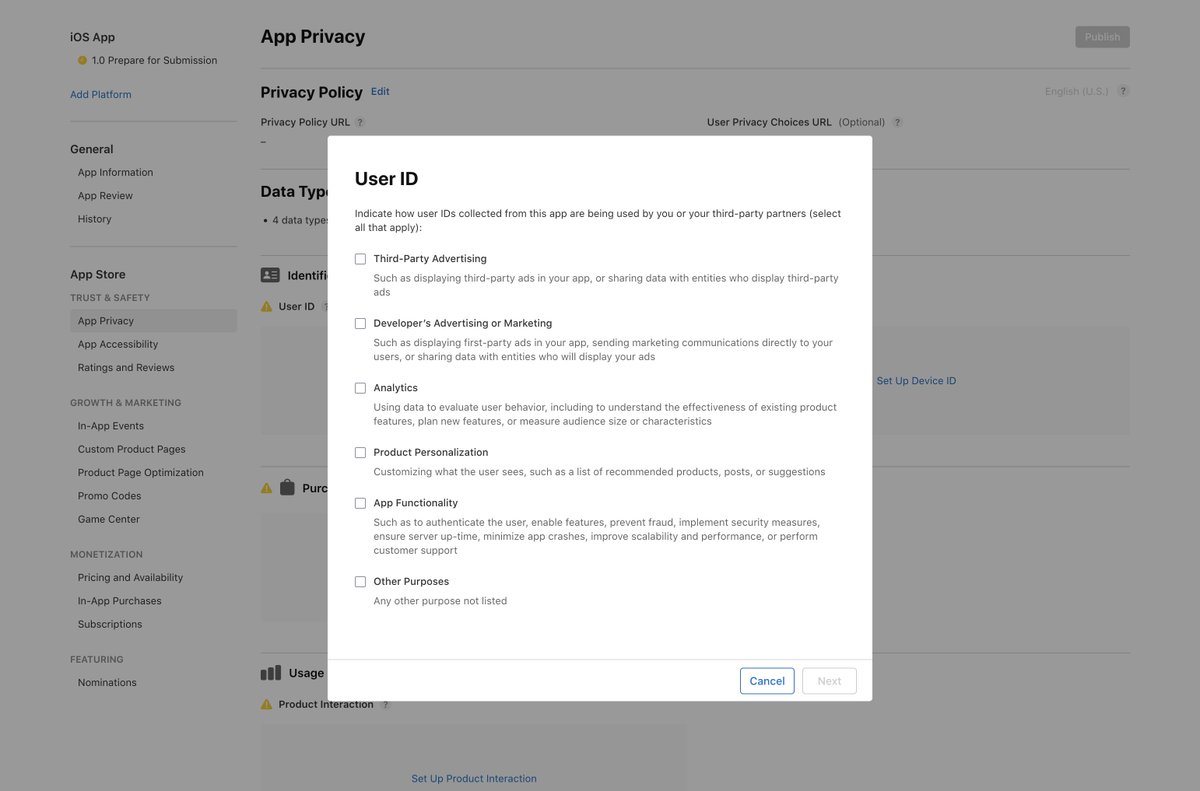
> These are the basics for TikTok tracking, your app may vary if you collect images, messages, or use a different payment processor.
4. Ad Setup 💅
> There's a bunch of niche settings here, that if you mess up, will tank your ad and waste your money! So pay close attention.
- Advertising objective - Choose "app install"
- iOS 14 dedicated campaign - Toggle iOS 14 campaign. - Choose your app from the select box. If it doesn't appear it's not verified properly, go back to step 3. - Disable the "Use app profile page".
> This is really important. It takes user to a custom app page, they need to click AGAIN to go to the actual app store. This adds friction. I've not AB tested yet, but likely to add drop off.
- Campaign settings
-
Select Campaign Budget.
-
This way TikTok will optimise across your chosen ads.
-
Set daily budgets. General advice is upwards of $30 a day.
-
Ideally $50 for three days to test a creative.

**4. Optimisation & Bidding
-** Our goal is in app events: targeting users who actually pay for our app!
-
Our event is subscribe as we made earlier.
-
If you don't see this, go back to setup above in step 3.
-
Bid Strategy: Highest Volume.
5. Schedule
-
Set a start and end date if you want to spend a very specific amount.
-
Otherwise the ad will keep running (and you'll keep spending).

6. Audience Targeting
-
Set location to US only (spends the most in app store). Unless your targeting a very specific country.
-
If you don't see this, your account is wrong & you need to create a new one.
-
Target age, lowest possible for widest reach: 18.
-
Languages: English speaking only (don't want to target spanish in the US).
-
Generally: audience broad as possible, let TikTok algorithm work its magic.
-
Unless your app specifically aimed at women, or age group!

7. Placements
-
Set to TikTok only! We don't want our ads in Pangle.
-
Allow users to comment and share, is good for engagement.

8. Creative Assets
-
TikTok will try and auto choose your creatives for you. This is a very new feature so jury is still out I think! It'll choose a few posts for you. If you want, you can choose your own posts to run as before.
-
Click the pencil icon, and then Switch to Custom Selection.

**9. Text and add-ons
-** Choose your TikTok account
-
Add some text applicable to your app. This is the main text on your ad & describes what you're promoting.
-
Edit the Call to action text: Only keep ones that are applicable to your ad: don't use "Order Now" for a subscription based app.
Get rid of selling points: makes your ad look too much of an ad.

10. Automatic Enhancements
- Turn all of these off. They do weird things to your ads like dumb music, messing with image quality etc. Generally not recommended.

11. Destination
- Keep it set to app store as we had before. We want as little friction as possible. Some advice online says this makes no difference, I'm going to A/B test this myself in the next few days and will report back.
Congrats. That's it! 🎉
> You can now escape the matrix, buy a lambo, and move to Bali. > > If you run into trouble or have any advice / suggestion, leave a comment, or send me a dm.
 — "AI generated. None of the creators are affiliated with this article."
Related articles

I scaled My App to 15K/Month in 2 Months (FULL GUIDE)
My apps made 18K this month at 18 years old....

How We Scaled RIZZ app to $400K/Month (Full Playbook)
it wasn't the product. it was a machine we built underneath it, and once you see how it works you'll spot it all over your feed.

How to Hit 6 Figures MRR With a Consumer App in 6 Months. No Ads Required.
i've studied over 60 apps that scaled past $100K MRR using creator content instead of paid acquisition.